Claude for SEO: 10 Workflows That Actually Improve Rankings
Most teams open Claude and ask it to write on a blank page. That is the smaller part of what Claude does. Claude for SEO earns its keep on the analysis work nobody...

Most teams open Claude and ask it to write on a blank page. That is the smaller part of what Claude does. Claude for SEO earns its keep on the analysis work nobody wants to do by hand.
Think about where your time is wasted. Analyzing Search Console data, finding pages that compete with each other, writing meta descriptions for products, and mapping redirects after a migration are all repetitive tasks. They don’t need much creativity. They need time and consistency. That’s where AI for SEO can help, especially with WordPress SEO.
The article covers 10 practical Claude workflows for SEO you can run this week. Each one explains what you need, the steps to follow, and what you get back.
Quick Summary
Claude for SEO works best as an analysis and transformation layer over data you already have, not as a content generator. Feed it Search Console exports, crawl reports, competitor pages, or WordPress CSV exports, and it returns prioritized fixes you can apply in Yoast, Rank Math, or the block editor. The 10 workflows below cover keyword research, internal linking, metadata, schema, redirects, and AI search visibility.
What You Need Before Running Any Claude for SEO Workflow
Every workflow requires setting up a project first. If you skip this, you’ll have to explain your business again in every conversation.
A project is a persistent folder that holds context. Load it once, and every chat inside it starts with your site details already in scope. The Claude documentation covers how projects work, but for SEO, the files that matter are simple.
Load these into your project:
- A business profile: what you sell, who buys it, which markets you serve
- A brand voice file: two or three real examples of your published writing
- An entity record: your official business name, founders, locations, and social profiles
- Your last Google Search Console export, labeled clearly by date range
- A list of your live URLs pulled from your XML sitemap
Name every file clearly. If you upload three files all named export.csv, Claude cannot tell them apart, and you may not remember later either.
For live data instead of static uploads, connect your tools through the Model Context Protocol. MCP lets Claude read from and write to your actual stack rather than waiting for you to paste things in.
The MCP getting started guide walks through the setup, and on the WordPress side, a WordPress MCP connection means Claude can pull post data and push updates without you touching a CSV. The same approach applies to store data through AI automation for WooCommerce products.
The Best SEO Tools for Claude to Work Alongside
Ask for search volume or rankings without providing data, and you may get made-up numbers. Give it the data first, then ask for analysis. That simple habit makes the difference.
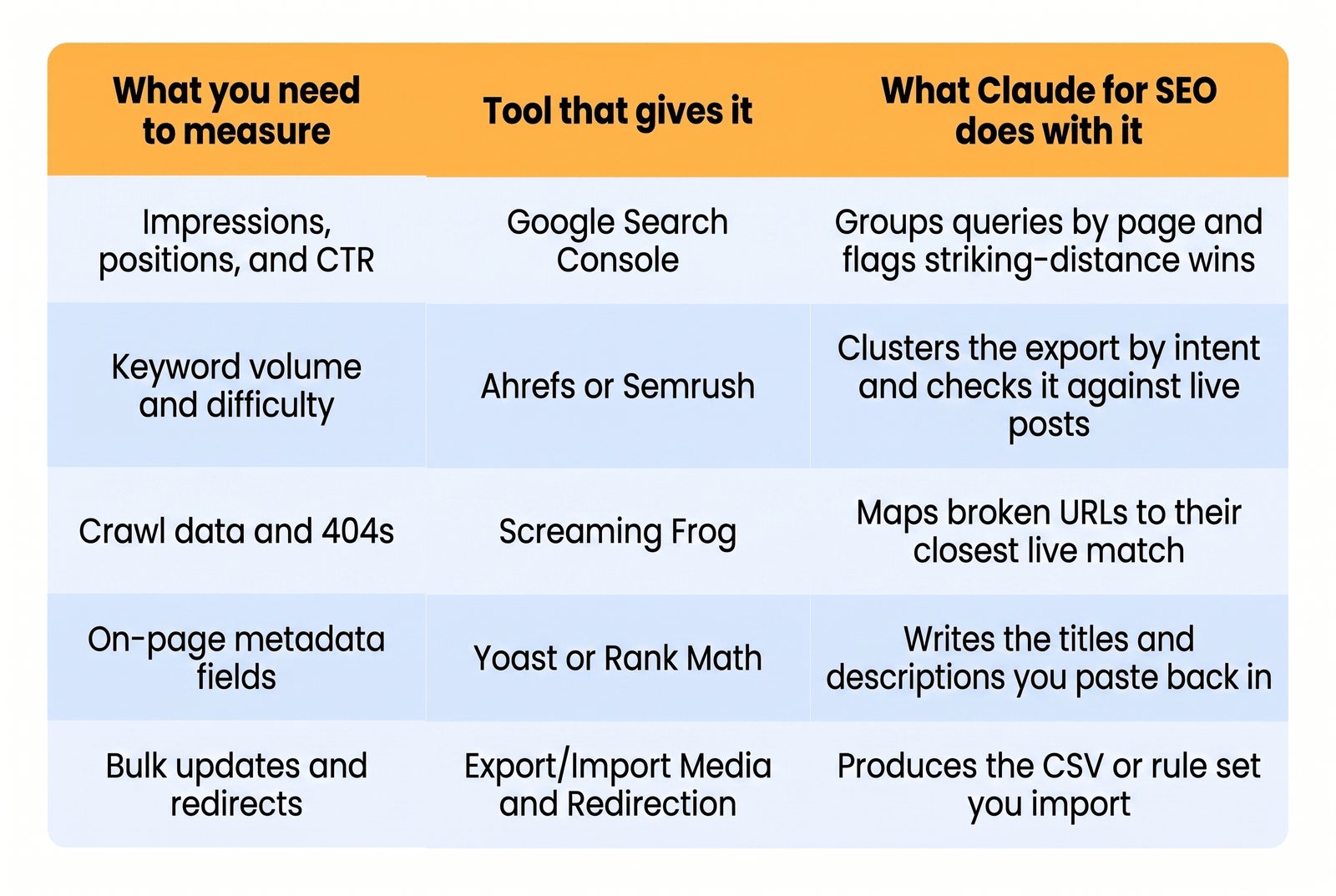
None of these made the list because they’re the ‘best’ tools; they made it because each one produces an export, and exports are what Claude reads well.
Your AI SEO strategy should decide which tool owns which number before you open a single chat. Search Console owns performance. Your crawler owns the technical state. Claude owns the reading, grouping, and rewriting in between. The same split applies if you use ChatGPT for SEO or any other model, since the failure mode is identical when you skip it.
1. Find Keywords Sitting on Page 2 and Push Them to Page 1
Pages ranking between positions 8 and 20 already have Google’s attention. They just do not convert impressions into clicks.
These are your fastest wins. The page is indexed, relevant, and close. It usually needs a sharper title, a missing subtopic, or a few sentences covering a related query it half-answers.
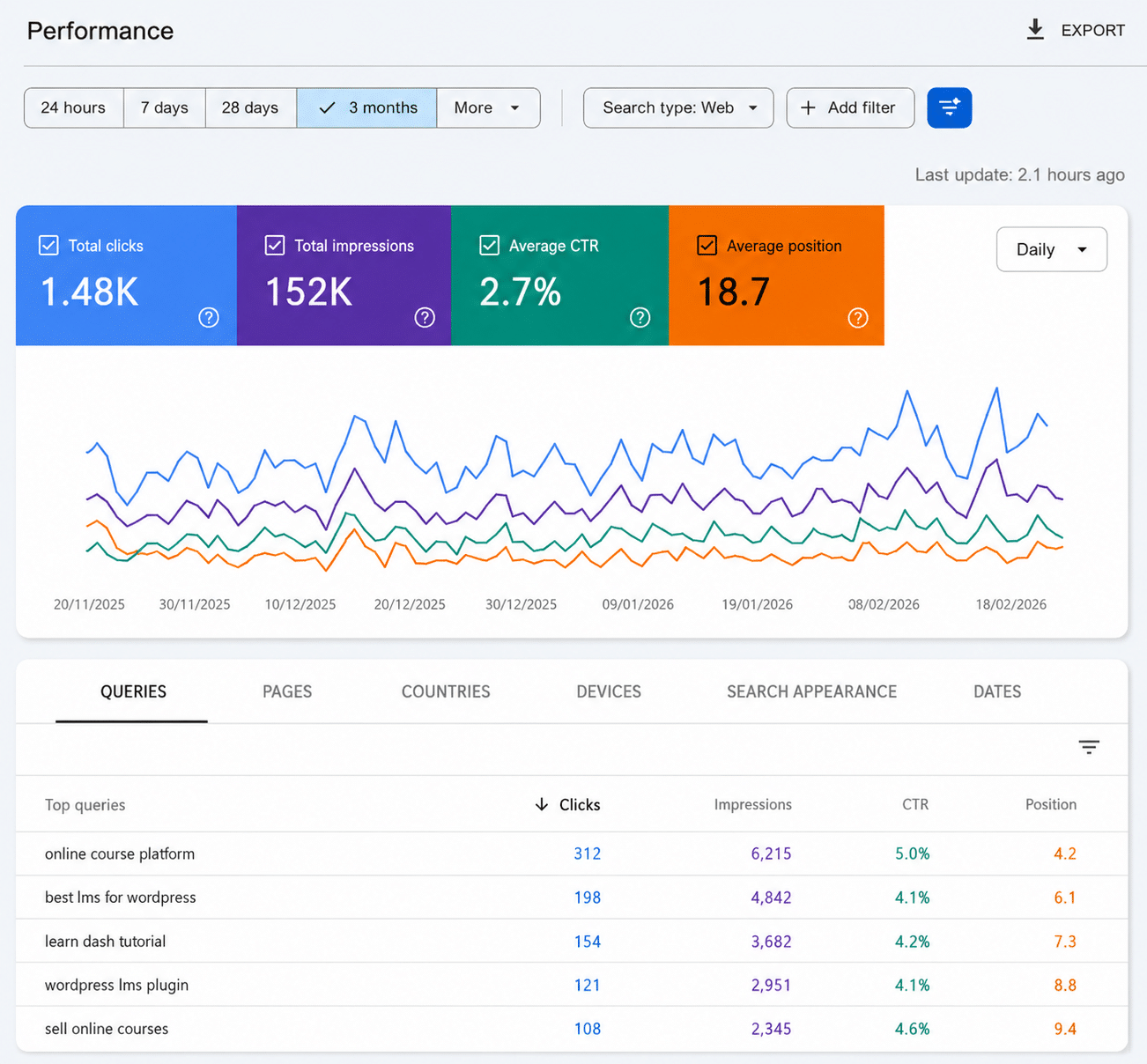
What you need:
- A Search Console performance export covering the last 90 to 365 days, with query, page, clicks, impressions, CTR, and position columns
- The content of the page you want to fix, copied from the WordPress editor
How to do it:
- Upload the Search Console performance export.
- Ask Claude to filter for queries with more than 500 impressions sitting between positions 8 and 20.
- Ask it to group those queries by landing page (so you can see which single page is closest to breaking through).
- Paste the page content into Claude.
- Ask it to find missing queries and suggest titles/meta descriptions.
- Update the page in Yoast, Rank Math, or the WordPress editor.
You get a ranked list of pages, the queries they’re missing, and what to add. Start with the page getting the most impressions, not the lowest CTR.
Fixing three of these usually moves more traffic than publishing two new posts. That is the practical argument for using Claude for SEO on existing pages before writing anything new, and it pairs well with a broader plan to improve your WordPress SEO.
2. Pull the Gaps Out of Competitor Pages That Outrank You
When a competitor outranks you on a keyword you should own, the gap is usually coverage, not word count.
Their page answers a question yours ignores. It mentions a tool, a price range, or a use case that Google has decided belongs in that result. Reading three competitor pages carefully takes an hour. Claude does the comparison in a few minutes.
What you need:
- Your target keyword
- The full text of the top three to five pages currently ranking for it
- Your existing page, if you have one
How to do it:
- Paste competitor pages into one Claude conversation and label each by URL.
- Ask Claude to list the main topics and subtopics each page covers. Then compare them with your page to find gaps.
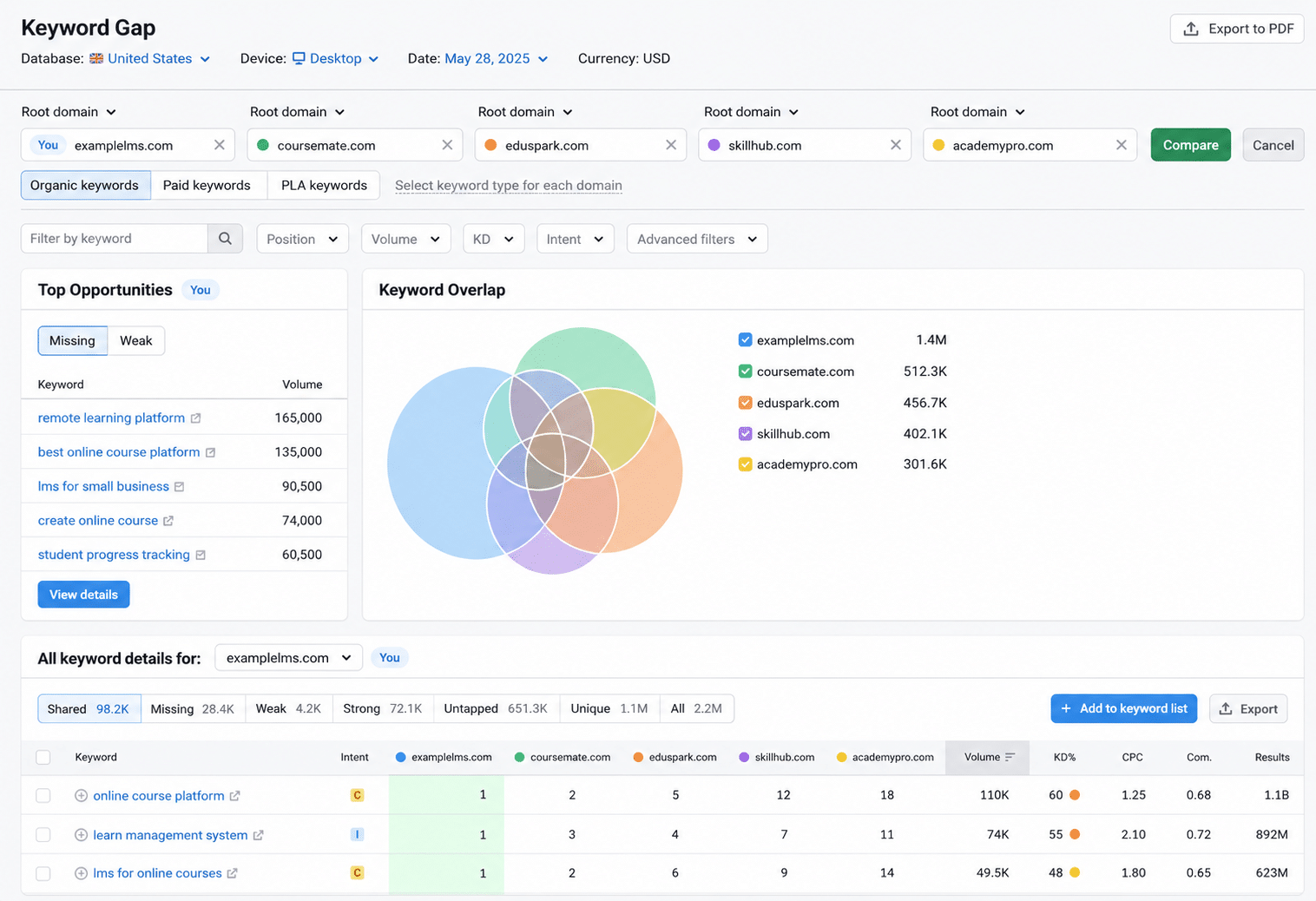
- Ask which questions competitors answer that your page misses.
- Request a brief with the recommended headings, missing topics, and unique angles.
- Review the brief and remove anything irrelevant to your search intent.
- Use the final brief to rewrite the page.
The output is a gap list, not a draft. You will see which sections are table stakes and which ones give you room to say something different. Anything all five competitors cover is a requirement. Anything none of them cover is your opening.
3. How to Use AI to Conduct Keyword Research for SEO
Keyword lists are cheap. Deciding which keyword belongs to which page is the actual work.
This is where a Claude for SEO workflow beats a spreadsheet. You already have the keywords from Ahrefs, Semrush, or Search Console. What you need is intent grouping and a check against your existing posts so you do not publish something that competes with a page you wrote in 2023.
What you need:
- A raw keyword export with volume and difficulty columns
- A list of your published post titles and URLs from your sitemap
How to do it:
- Upload both files and ask Claude to group the keywords by search intent.
- Ask it to name the intent behind each cluster in plain language, for example, comparison, pricing, or how-to.
- Ask which clusters your existing posts already target, and flag any two posts chasing the same intent.
- Assign one pillar page and its supporting pages per cluster.
- Output the result as a table you can drop into your content calendar.
You get clusters with a clear owner page, a list of cannibalization conflicts to resolve, and a publishing order. Exporting keyword files manually is the slow way. Connect Claude to Ahrefs instead, and it becomes your WordPress SEO partner.
4. Build Internal Links That Match Context, Not Just Keywords
Most internal linking plugins match on keyword strings, which is how you end up linking the phrase “booking system” to a post about payment gateways.
Meaningful internal linking needs someone to read both pages and decide whether the connection helps a reader. Claude can do at scale what would take an editor far longer.
What you need:
- A list of your published URLs with titles, exported from your sitemap or a plugin
- The full text of the new or updated post you want to link from
How to do it:
- Upload your URL list so Claude knows what exists on the site.
- Paste the draft you are working on.
- Ask for link suggestions that include the exact sentence to edit, the anchor text, and the target URL.
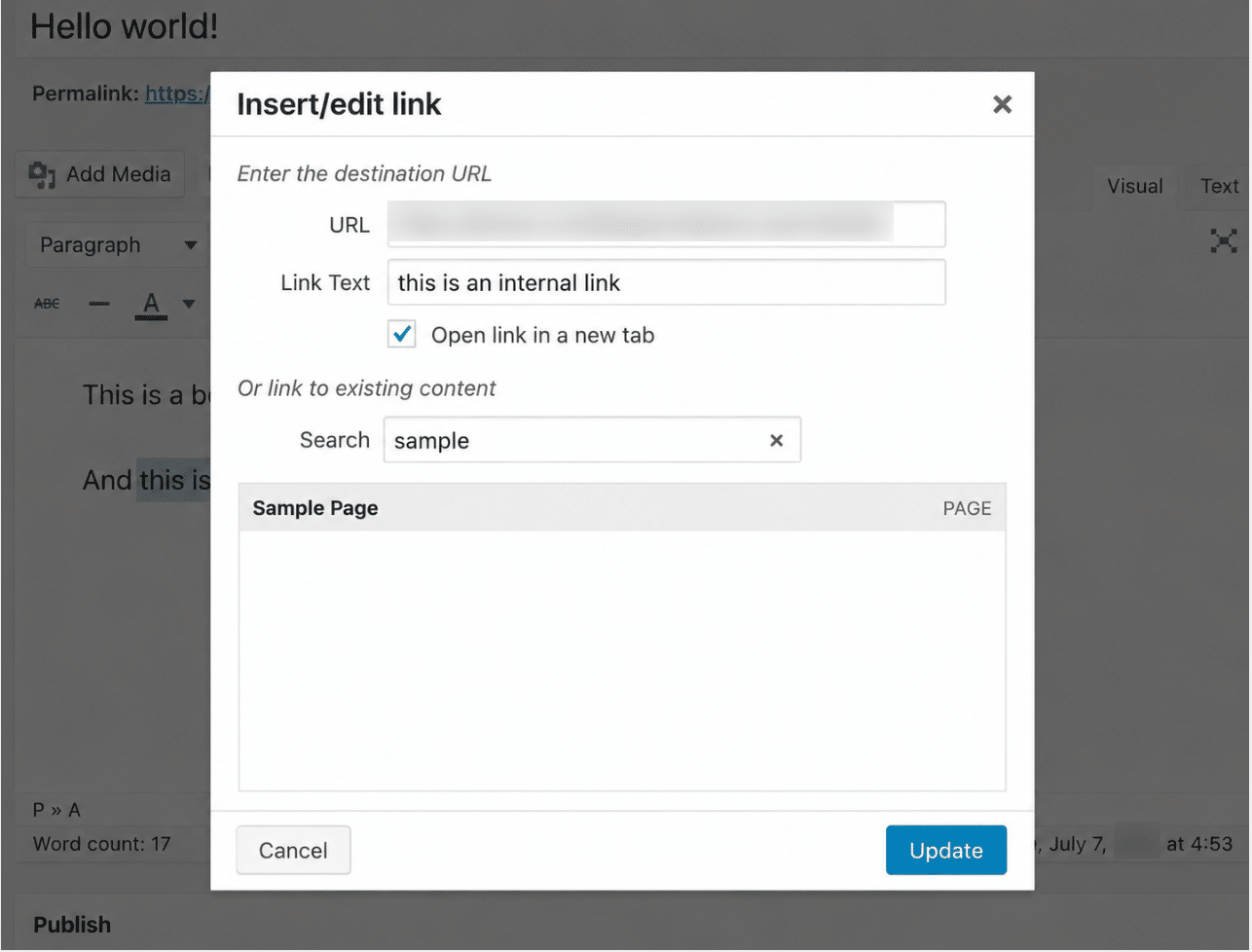
- Tell it to skip any link where the connection is only a shared word, not a shared topic.
- Ask which of your published pages have no inbound internal links at all.
The output gives you sentence-level placements plus a list of orphan pages. Apply the links manually in the block editor, or bulk import them if you run a linking plugin. The orphan list is often the more valuable half.
5. Rewrite Titles and Meta Descriptions Across Hundreds of Pages
Large WordPress sites accumulate duplicate and missing metadata faster than anyone can fix it manually.
Product catalogs are the worst case. A store with 400 items usually has 400 near-identical descriptions, or none. This is the clearest example of how to use AI for SEO at a scale that manual editing cannot match.
What you need:
- A CSV export containing post ID, current title, target keyword, and the first paragraph of each page
- Access to a bulk import tool such as WP All Import or Rank Math’s CSV import
How to do it:
- Upload CSV.
- Set title and description limits.
- Ask Claude to generate proposed titles/descriptions.
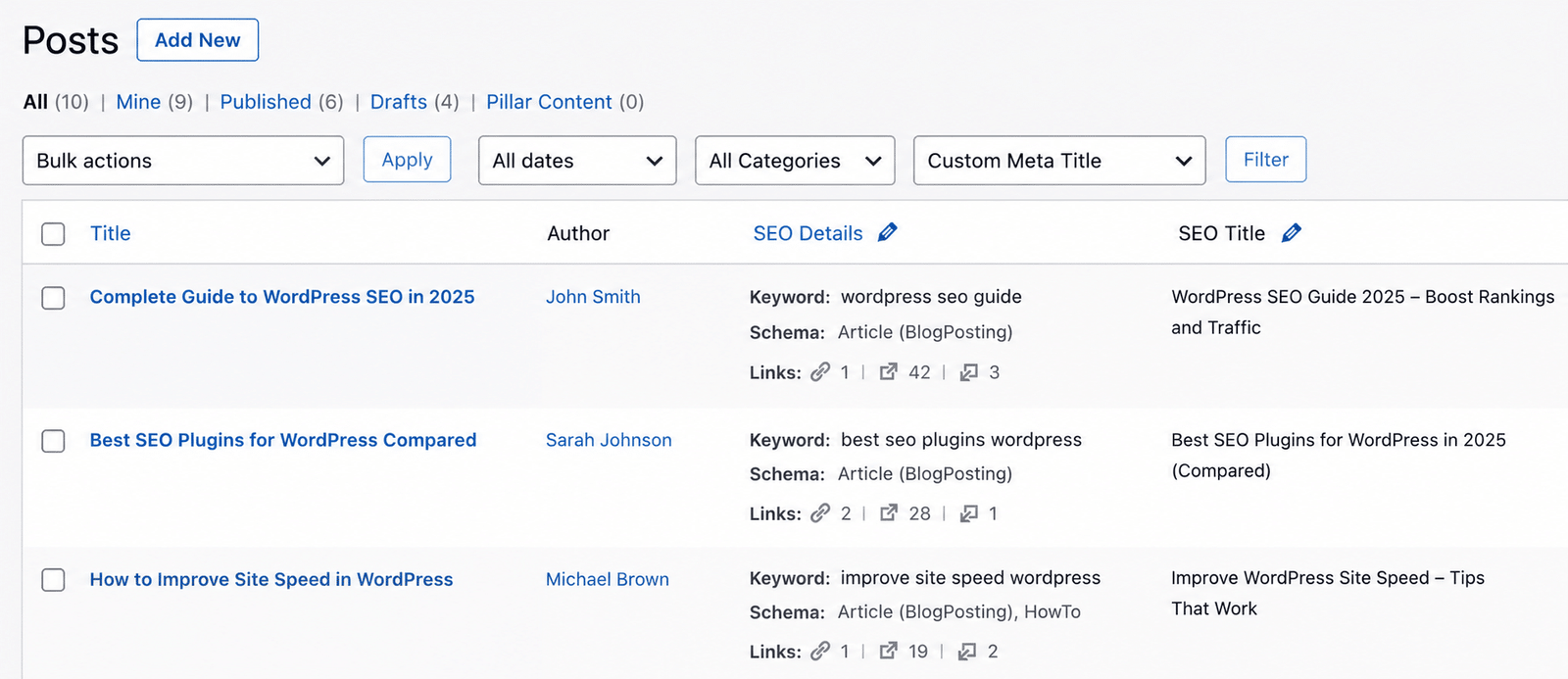
- Keep the original values in adjacent columns as a backup.
- Flag rows with thin source content.
- Review flagged rows.
- Spot-check 20 random rows for voice.
- Import the approved CSV.
Keep the post ID in every row. Matching on titles alone breaks the moment two products share a name. Once metadata is consistent, the same export becomes a starting point for auditing your WordPress schema markup across the same pages.
Looking for a Ready-Made Solution?
Explore our WordPress, WooCommerce, and LMS plugins built to extend functionality without custom development.
6. Write Answer Blocks That AI Overviews Can Quote
AI search engines quote passages, not pages. If your article has no self-contained answer, there is nothing to pull.
A page can rank well and still get skipped in AI overviews because the answer is spread across four paragraphs. The fix is structural. Put a direct, complete answer near the top that makes sense without any surrounding context.
What you need:
- The article you want to fix
- The actual question readers ask, taken from Search Console queries or the People Also Ask box
How to do it:
- Paste the article and state the exact question it should answer.
- Ask Claude for a 40- to 60-word answer that stands alone with no reference to earlier sentences.
- Run the extractability test: read the block on its own and check whether it still makes sense.
- Place it directly under the H1, before your opening paragraph.
- Repeat for each major section so every heading has its own quotable answer.
The result is short blocks a retrieval system can lift cleanly. Watch for pronouns and phrases like “as mentioned above,” which break a passage the moment it leaves the page. Several WordPress AI tools now handle placement, but the writing itself still needs judgment about what a reader actually asked.
7. Generate Schema Code That Passes Validation the First Time
A broken schema is worse than no schema, and most WordPress sites run three plugins, all writing their own version of it.
Yoast outputs one organization block, your theme outputs another, and an FAQ plugin adds a third. Search engines see conflicting signals about the same business.
What you need:
- The page content and its type, for example, article, FAQ, or how-to
- Your author bio, business name, and official URLs
- Whatever schema your plugins currently output, viewable in the page source
How to do it:
- Paste the existing schema and ask Claude to identify duplicate or conflicting blocks.
- Ask for a single nested structure connecting author, organization, and article in one graph.
- Tell it to flag any property it cannot verify from the content you supplied, rather than inventing a value.
- Validate the output in the Rich Results Test before it goes live.
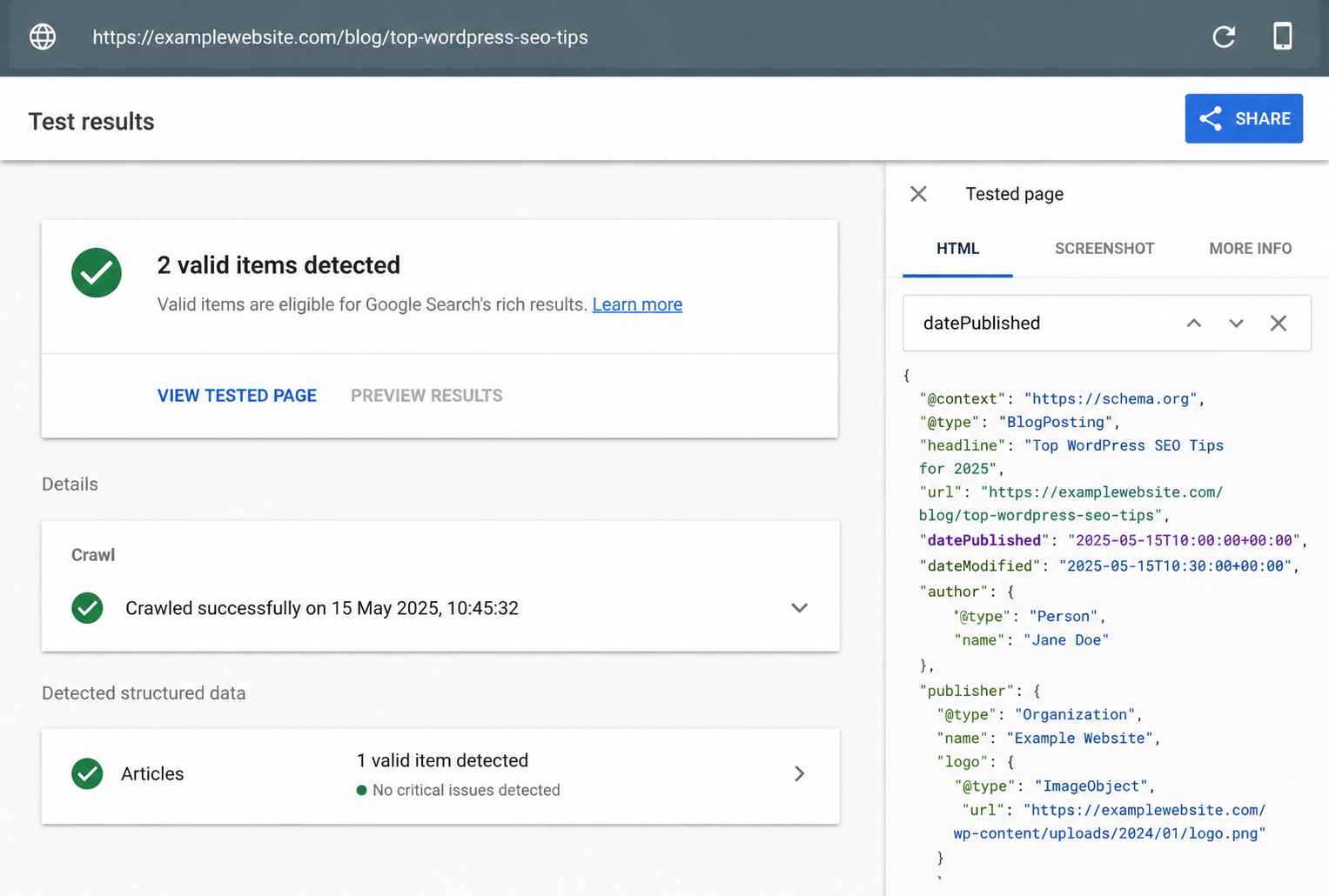
- Add the approved code through Rank Math’s custom schema field or a child theme function.
Check every property against the schema.org vocabulary if you are working with a type you have not used before. For sites that want to move off plugin-generated markup entirely, adding custom schema to WordPress gives you one authoritative source instead of three competing ones.
8. Write Alt Text for Your Whole Media Library in One Pass
A media library with 2,000 images and no alt text is an accessibility problem and a lost traffic channel at the same time.
Nobody writes 2,000 descriptions by hand. So the job sits in the backlog for years while image search sends traffic to competitors.
What you need:
- A CSV export of your media library with attachment ID, file name, parent post title, and the paragraph text surrounding each image
- Export/Import Media plugin.
How to do it:
- Upload the CSV so Claude can see each image’s context, not just its file name.
- Ask for descriptive alt text that reflects what the image shows and where it sits on the page.
- Set a rule against keyword stuffing, since alt text serves screen reader users first.
- Review a sample, paying attention to decorative images that should have empty alt attributes.
- Push the approved file with an Export/Import Media plugin.
Surrounding paragraph text gives the AI the context needed to create useful alt text. Without it, descriptions stay generic, and with it, you get alt text that matches the point the image was included to make. If you also generate visuals, an AI image generator for WordPress can create the assets, and this workflow can describe them.
9. Map Broken URLs to Redirects Without Doing It by Hand
Every site restructure leaves behind URLs that used to rank and now return 404s.
Link equity still points to those old URLs. Manually mapping hundreds takes too much time, so many teams redirect everything to the homepage and lose that value.
What you need:
- A crawl report listing your 404 URLs, from Screaming Frog or a similar crawler
- Your current live URL list from the XML sitemap
How to do it:
- Upload both URL lists and match each broken URL to the closest live page.
- Flag URLs with no good match instead of forcing one.
- Group URLs into regex rules when whole folders have moved.
- Review and decide on the flagged URLs manually.
- Import the final redirects into your Redirection plugin or server config.
Directory-level regex rules are the time saver here. One rule can replace 80 individual redirects, which keeps your redirect table manageable. If broken URLs are part of a wider pattern of WordPress errors on the site, fix the underlying cause before mapping, or you will be repeating this next quarter.
10. Check Whether AI Search Engines Cite You or Your Competitors
Ranking on Google and getting cited in an AI answer are now two different outcomes, and most teams only measure the first.
You can hold position three and still be invisible when someone asks the same question in ChatGPT or Perplexity. Worse, a competitor with weaker rankings may be the one getting cited.
What you need:
- Your domain and two or three competitor domains
- A list of 10 to 20 questions your buyers actually ask
How to do it:
- Run each question through the AI engines you want to track.
- Paste the answers into Claude and see who gets mentioned for each question.
- Ask it to separate brands that are named from brands that get an actual linked citation, since these are not the same thing.
- Ask which questions your competitors own and which nobody answers well.
- Turn the unanswered questions into your next content priorities.
The output is a gap map showing where you appear, where a competitor does, and where the field is open. Unanswered questions are the cheapest wins. This closes the loop on a full Claude for SEO process, and it applies whether you build a WordPress site with AI or manage one that has been running for a decade.
Key Takeaways From These Claude for SEO Workflows
- Supply the data yourself. Claude for SEO cannot tell you rankings or search volume, and it will guess if you ask.
- Fix pages sitting on page two before you write new ones. The traffic is closer than a new post.
- Resolve keyword cannibalization before commissioning content, or your new post competes with your old one.
- Always keep the post ID in bulk operations. Title matching breaks on duplicates.
- Test every answer block on its own. If it needs the paragraph above it, an AI engine cannot quote it.
- Validate schema before publishing. Broken markup costs you more than missing markup.
- Review output on a staging copy first, and keep the original values so you can roll back.
Conclusion
The gap between teams getting results from AI and teams getting nothing usually comes down to the quality of the input. Claude for SEO produces useful output when you hand it real exports, real competitor pages, and real crawl data. It produces generic advice when you give it a topic and nothing else. Every workflow above starts with a file because that is what makes the difference.
Running these on a live WordPress site is where things get complicated. Bulk imports can replace the wrong fields, the schema can conflict across plugins, and redirect rules behave differently on Nginx than they do in .htaccess. Our WordPress automation services can handle these repetitive tasks without adding more manual work to the process.
If you would rather have someone handle the implementation, our WordPress SEO services team works on exactly this kind of technical cleanup, from schema architecture to migration redirects. Contact our team and tell us what your site is dealing with.
FAQs
Can Claude do SEO?
Yes, for analysis, transformation, and technical output. Claude for SEO handles Search Console exports, competitor comparisons, schema generation, metadata at scale, and redirect mapping. It cannot check live rankings, keyword volume, or backlink profiles. Supply that data from your SEO tools, then use Claude to interpret it.
Is Claude better than ChatGPT for SEO?
Both work. Claude handles long documents without losing track of details, which suits crawl exports and multi-page comparisons. ChatGPT for SEO has broader plugin support in some stacks. The bigger factor is your process. A structured workflow with real data beats tool choice every time.
Which AI is best for SEO in 2026?
There is no single answer, and any tool marketing one is selling something. The best AI tool for SEO is whichever one connects to your actual data. Claude suits long-context analysis, other models suit different tasks. Your data pipeline matters more than the model.
Can I use Claude for keyword research?
Yes, with a supplied keyword list. Export keywords from Ahrefs, Semrush, or Search Console, then ask Claude to cluster them by intent and check them against your existing pages. It cannot generate volume or difficulty numbers. Workflow 3 above covers the full process.
What Claude prompts should I use for SEO?
Start with the 10 workflows in this article. Each one specifies the input files, the questions to ask, and the output format. The pattern that works: upload real data, state what you want grouped or flagged, and ask for a structured table rather than prose.
How do I set up a Claude project for SEO?
Create a project and upload five files: a business profile, brand voice samples, an entity record, your latest Search Console export, and your live URL list. Label everything clearly by date and type. The setup section above covers what belongs in each file.
Is Claude free for SEO use?
A free tier exists with usage limits that most SEO work will hit quickly, particularly when uploading large exports. Paid plans raise those limits and add project features. Check current plan details on Anthropic’s site, since limits and pricing change.
Can Claude generate meta descriptions and title tags in bulk?
Yes. Export a CSV with post ID, title, target keyword, and opening content, then ask for a returned file with proposed values alongside the originals. Workflow 5 covers the process. Always keep the post ID so your import updates the correct records.
Can Claude analyze Google Search Console data?
Yes, and this is one of its strongest uses. Upload your performance export and ask it to group queries by page, flag low click-through rates, or find pages losing impressions. Workflow 1 walks through the striking-distance version of this analysis.
Will using Claude for SEO get my site penalized?
No, provided the output is reviewed and useful. Google’s guidance on AI-generated content says that using automation mainly to manipulate rankings violates its spam policies, while content quality matters more than production method. Publishing unreviewed output at volume is the risk.
Need Ongoing WordPress Maintenance & Support?
We handle updates, performance monitoring, security hardening, and technical fixes so your WordPress and WooCommerce site stays stable and secure.
Plugin Not Working in WordPress? Here’s Why
Is your plugin not working in WordPress? Here are the 7 most common causes and fixes for plugin conflicts, errors,…
Read More...
WordPress SEO Consultant, Freelancer, or Agency: What Each Costs
Hiring SEO help gets expensive fast. See what an SEO consultant, freelancer, or agency really costs before picking one for…
Read More...
AI Search Optimization Services: Strategy and Best Practices for 2026
Want your brand found in AI search? Learn what AI search optimization services should include in 2026, from audits to…
Read More...
