Is WordPress Down Right Now? What to Know
Wondering is WordPress down or if it's just your site? Check WordPress status, find the cause, and know when to get emergency WordPress help.
Your WordPress won’t load, and the first question is simple: is WordPress down, or is this problem just on your site? That difference changes what the next step is.
There are two separate things that can go wrong here. WordPress.com and the larger WordPress infrastructure can have an outage, a kind that shows up on the status page and affects a large number of sites at once. Or WordPress itself can be running fine while your individual website, hosted on your server, has its own problem: a plugin conflict, a DNS issue, a database error, or something local to your setup. Most of the time when someone searches “WordPress down,” it’s the second situation, not the first.
This blog guide is about both. You’ll see how to check for a wider WordPress outage and how to tell if the problem exists only with your website, what common error messages mean, and when the situation is serious enough to bring in outside help.
Pro tip
Check the WordPress.com status page before troubleshooting your site. If everything is running normally, you can rule out a wider WordPress outage and focus on what’s actually causing the problem on your site.
Is WordPress Down at the Moment?
Before assuming that your website has a problem, check whether WordPress itself is having a bigger issue. Two sources are worth checking first.
The WordPress.com status page shows the current operational status of WordPress.com and related services. If something is actively affecting the platform, it shows up there. The Automattic status page covers a larger set of Automattic-run services, including WordPress.com, so it’s worth checking both.
An incident on either status page doesn’t mean every WordPress website is down. WordPress.com and Automattic run hosted infrastructure, while most WordPress sites are hosted separately. Your site might still be working during a wider incident, or it might be down even when those status pages are green.
If both status pages show normal operation, the problem is almost certainly with your individual website, not with WordPress entirely.
Quick Answer
If you’re asking if WordPress is down, check the WordPress.com status page and the Automattic status page first. If both show everything running normally, the problem is with your website, not WordPress itself. Test your site from another device or network, then look at your hosting, DNS, plugins, or database.
Is WordPress Down, or Is Your Website Down?
If the status pages look normal, the next step is figuring out whether the problem is limited to your website or something wider. A few quick checks settle the issue fast.
Try loading your site from a different device or a different network, your phone on mobile data works well for this. Ask someone else, like a colleague or a friend, to check it from their connection. Run your domain through the WordPress uptime checker, both of which test your site from outside your network.
What you find points to a specific cause.
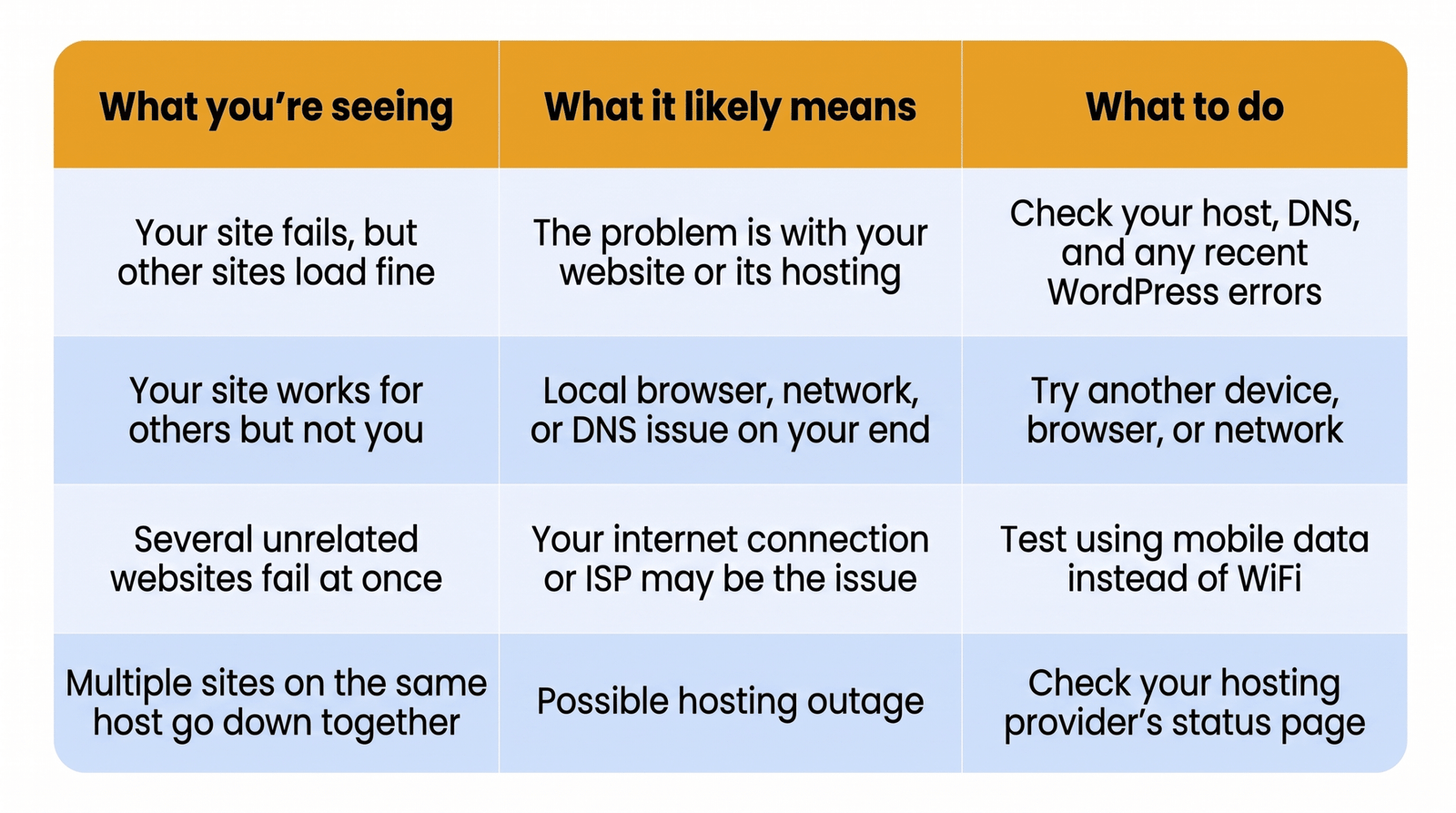
If your site is the only one down and it stays down across devices and networks, the issue is actually with your website, not WordPress or your connection.
Your WordPress Website Is Down, Not WordPress Itself
If WordPress isn’t experiencing a larger outage and the problem stays with your site across devices and networks, the cause is somewhere in your setup.
Here are the main places to check:
- Hosting or server issues
- DNS or domain problems
- SSL certificate errors
- Plugin or theme conflicts
- Outdated or incompatible PHP
- Database connection failures
- CDN or caching problems
- Security issues, including malware or a hacked site
Any one of these can take a site offline on its own. Sometimes two issues happen together, such as a plugin update that coincides with a PHP upgrade, making it harder to isolate the cause at first glance.
A specific error message is usually the fastest lead. Common WordPress error messages point to a fairly small set of causes once you know what to look for.
My WordPress Site Broke, What Changed
Most WordPress sites don’t break without any reason. Something usually changed just before the issue, and finding it is often the fastest way to identify the cause.
Start by asking what you did last, or what your host, a plugin developer, or an automatic update did on its own.
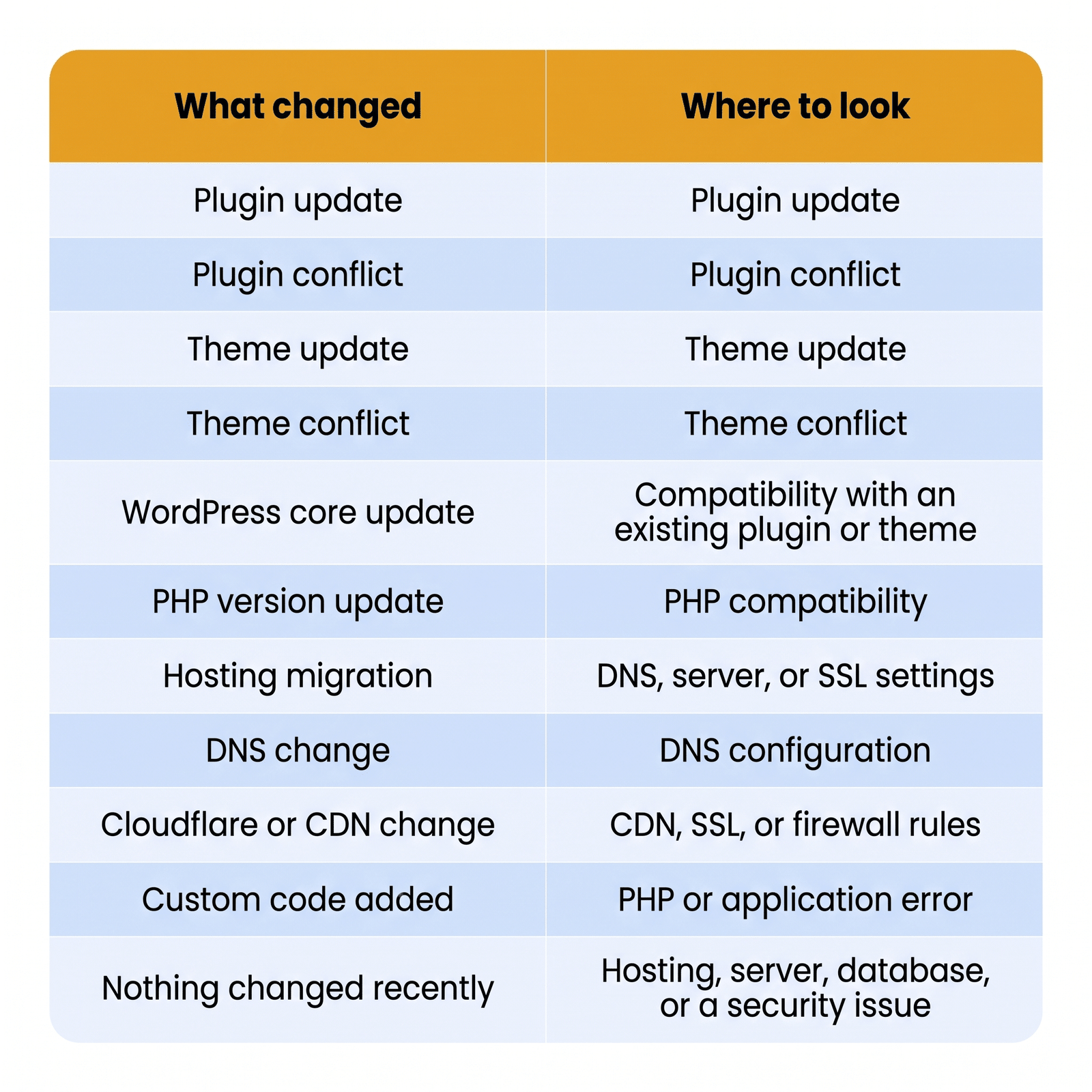
If nothing on your end changed, the cause is more likely on the hosting or server side, or something happened without your knowledge, like a background plugin update or a security event.
For a closer look at what “not loading” usually means once you rule out an outage, WordPress website not loading issues explain several of the more common front-end causes.
What Your WordPress Error Message Means
A specific error message simplifies things down fast. Here are a few of the ones people run into most when their WordPress site won’t load.
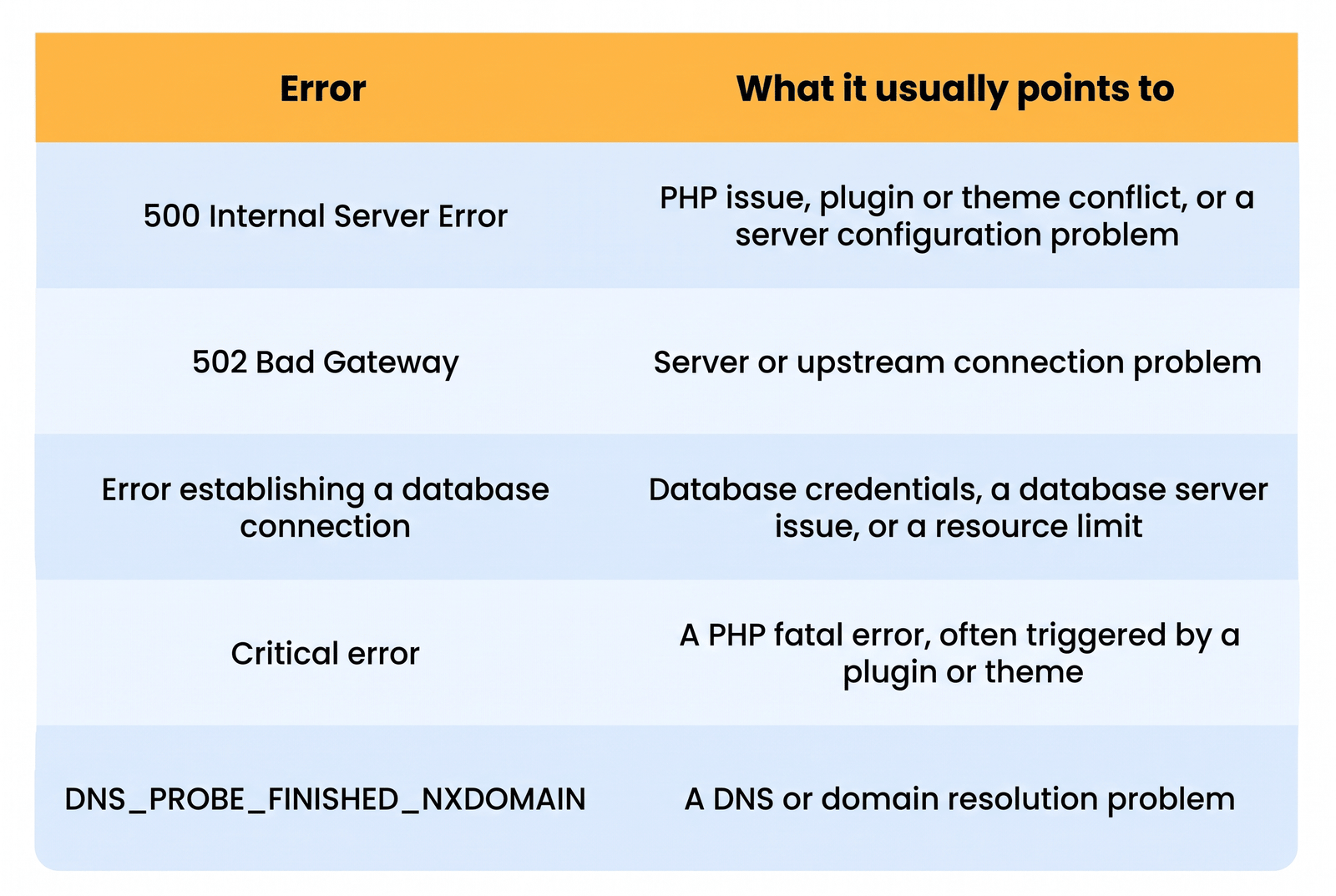
These five errors share what people search for when their WordPress website is down. For anything not listed here, common WordPress error messages go through a longer list with fixes for each one.
If the symptoms look less like a technical error and more like something was changed without your permission, unfamiliar admin accounts, unusual redirects, or spam content, it’s worth checking if your WordPress site was hacked. A free scan through the website checker can also flag known malware, though it won’t catch everything, so a clean scan isn’t a guarantee your site is untouched.
Looking for a Ready-Made Solution?
Explore our WordPress, WooCommerce, and LMS plugins built to extend functionality without custom development.
If security is an ongoing concern, our WordPress security service can help keep your site protected.
Extended downtime can affect search rankings if search engines can’t access your site during a crawl. See our guide to improving WordPress SEO for more SEO tips.
Are Multiple WordPress Sites Down?
If you manage more than one WordPress site and several go down at the same time, the cause is usually shared infrastructure rather than WordPress itself.
Check your internet connection first, since a local network problem can make every site you visit look broken at once. If that’s not it, look at whether the affected sites share a host, a DNS provider, or a CDN. Sites on the same hosting account often go down together during a server issue, and sites behind the same CDN can be affected by a single upstream problem.
If the affected sites don’t share any infrastructure and still went down together, it’s worth checking whether a WordPress outage is behind it.
When You Need Emergency WordPress Help
Not every WordPress problem requires outside help. Many issues can be resolved using the checks above, but troubleshooting yourself can become risky when the problem is more complex.
Consider getting emergency WordPress help if:
- The site is completely inaccessible, including the login page
- You’ve been locked out of hosting or server access
- The error points to a database or server-level problem you can’t resolve
- The site shows signs of being hacked
- The site is business-critical, and every hour offline has a real cost
- You don’t have a working backup to fall back on
- The problem keeps coming back after being fixed
- The basic checks in this article haven’t restored the site
If you’re not sure where to start on your own, WordPress help resources walk you through the general options, searching effectively, community forums, and when to bring in a developer.
For something more hands-on, WordPress support covers the broader support work we do beyond a single fix.
Already working with us? You can open a support ticket directly.
And if this isn’t the first time your site has gone down, our WordPress maintenance is worth a look, since most repeat outages come from the same handful of causes left unaddressed.
Key Takeaways
- Most “is WordPress down” searches turn out to be an individual website problem, not a WordPress-wide outage.
- A status page showing “operational” doesn’t rule out your specific site having an issue, since it only covers WordPress.com and related hosted services.
- Testing your site from another device or network is the fastest way to tell whether the problem is local to you or affects everyone.
- Most sites break because something changed right before, a plugin update, a theme update, a PHP version bump, or a hosting migration.
- Basic troubleshooting resolves most cases. Emergency help is worth bringing in when the site is fully inaccessible, hosting access is lost, or the same problem keeps recurring.
Conclusion
Most of the time, when someone asks is WordPress down, the answer is no. WordPress itself keeps running for the overwhelming majority of self-hosted sites, and the problem sits with an individual website’s hosting, plugins, DNS, or server rather than with WordPress as a platform. Checking the status pages first, then working through what changed on your own site, resolves most cases without needing to go further.
If you’ve been through these checks and your site is still down, or the cause turns out to be something you can’t safely fix on your own, that’s usually the point where bringing in someone who works with WordPress daily makes more sense than continuing to guess.
Our WordPress support services cover exactly this kind of situation, from diagnosing the cause to getting the site back online. Contact our team and let us take a look. We’ll help you find the problem and figure out the fastest way to fix it.
FAQs
Is WordPress down right now?
Check the WordPress.com status page and the Automattic status page. If both show normal operation, WordPress isn’t experiencing a wider outage right now.
Why is my WordPress site down?
The most common causes are hosting or server issues, DNS problems, plugin or theme conflicts, and database connection errors. It’s rarely caused by WordPress itself.
Is WordPress down at the moment, or is it my site?
If the WordPress.com and Automattic status pages show everything operational, the problem is with your individual website, not WordPress as a whole.
Is WordPress down for maintenance?
WordPress.com occasionally runs scheduled maintenance, which appears on its status page. Self-hosted WordPress sites don’t have a shared maintenance schedule since each one runs independently.
How do I know if WordPress is down for everyone?
Test your site from another device, browser, and network. If it fails everywhere, run it through a third-party checker like Down For Everyone or Just Me to confirm from outside your own connection.
Why did my WordPress site suddenly break?
Something usually changed right before it happened, a plugin update, a theme update, a PHP version change, or a hosting migration are the most common triggers.
How do I check for a WordPress outage?
Visit the WordPress.com and Automattic status pages first. An incident listed there may affect WordPress.com specifically, not necessarily every self-hosted website.
How do I put my WordPress site in maintenance mode?
Most WordPress hosts and plugins offer a built-in maintenance mode toggle. This temporarily takes your site offline for visitors while keeping it accessible to you through the dashboard.
When should I get emergency WordPress help?
If the site is completely inaccessible, you’ve lost hosting access, the problem involves a hack, or basic troubleshooting hasn’t worked, it’s time to bring in help rather than keep guessing.
Why is my WordPress site down when other sites work fine?
The cause is almost always local to your setup, hosting, DNS, a plugin conflict, or a database error, rather than a sign of a wider WordPress problem.
Need Ongoing WordPress Maintenance & Support?
We handle updates, performance monitoring, security hardening, and technical fixes so your WordPress and WooCommerce site stays stable and secure.
Plugin Not Working in WordPress? Here’s Why
Is your plugin not working in WordPress? Here are the 7 most common causes and fixes for plugin conflicts, errors,…
Read More...
WordPress SEO Consultant, Freelancer, or Agency: What Each Costs
Hiring SEO help gets expensive fast. See what an SEO consultant, freelancer, or agency really costs before picking one for…
Read More...
AEO vs. SEO: How to Get Your WordPress Site Cited in AI Answers
AEO vs. SEO explained in simple terms, plus the schema, content, and site fixes that help your WordPress site show…
Read More...
