The Complete Guide to eLearning SEO for Online Course Websites
An eLearning SEO guide for LearnDash sites: keyword research, course page optimization, Core Web Vitals, E-E-A-T, schema, and AI search visibility.

Creating an online course is just the first step. The next step is to help the right students find it through search. eLearning SEO allows course creators to optimise their websites, improve visibility, and attract learners actively searching for the skills they teach.
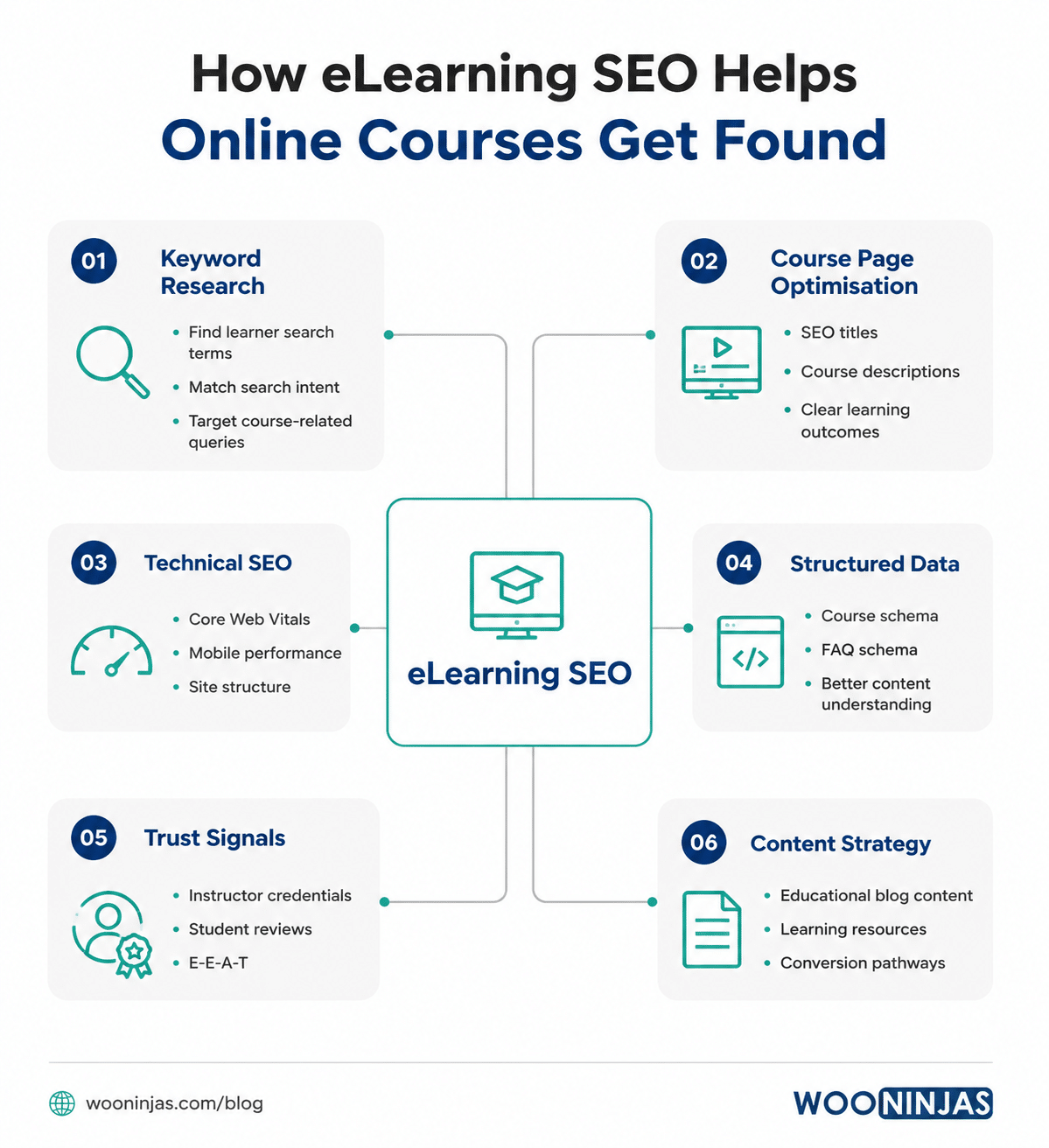
Your course pages are not just descriptions of what you are offering. These are the pages where potential students decide if your platform is credible and worth signing up for. A strong eLearning SEO strategy includes keyword research, course page optimisation, technical performance, structured data, and trust signals to connect your courses with the right audience.
The main factors that affect eLearning SEO are covered in this guide, including learning-focused keyword research, LearnDash course optimisation, Core Web Vitals, E-E-A-T, course schema markup, content strategy, student reviews, and AI-powered search visibility. In each section, you’ll find what matters and what you can do to improve your online course website.
These approaches are for LearnDash and WordPress-based eLearning platforms. The biggest opportunities are often to improve your technical performance, strengthen your course content and make it easier for search engines and students to understand your expertise.
Start eLearning SEO with Keyword Research Focused on learning intent
The most effective keywords for eLearning SEO are not necessarily the most general. The aim is to find out the exact words and phrases that potential students use when looking for a course, considering their options or preparing to join.
Search intent in eLearning falls into three groups. Informational searches represent research-stage visitors. Comparative searches represent people narrowing their options. Transactional searches represent people ready to enrol. Your course pages should target the transactional group. Your blog content should capture the informational and comparative stages and move visitors toward enrolment.
- Course-specific phrases: ‘online course in [topic]’, ‘[skill] training’, ‘[topic] certification programme.’
- Outcome-based phrases: ‘how to become a [role]’, ‘learn [skill] from scratch’, ‘[skill] for beginners.’
- Long-tail question phrases: low-competition, high-intent queries perfect for blog content that funnels visitors toward your courses.
- Niche or credential modifiers: ‘accredited’, ‘with certificate’, ‘for professionals’, ‘CPD approved.’
Use Google Search Console. You can see what search terms are bringing visitors to your site and what keywords your pages rank for on the 2nd page or lower. They often represent the quickest optimisation opportunities. Tools such as Ahrefs, Semrush and Ubersuggest can help you grow your keyword list and find new content opportunities.
Optimise Your Course Pages as eLearning SEO Assets.
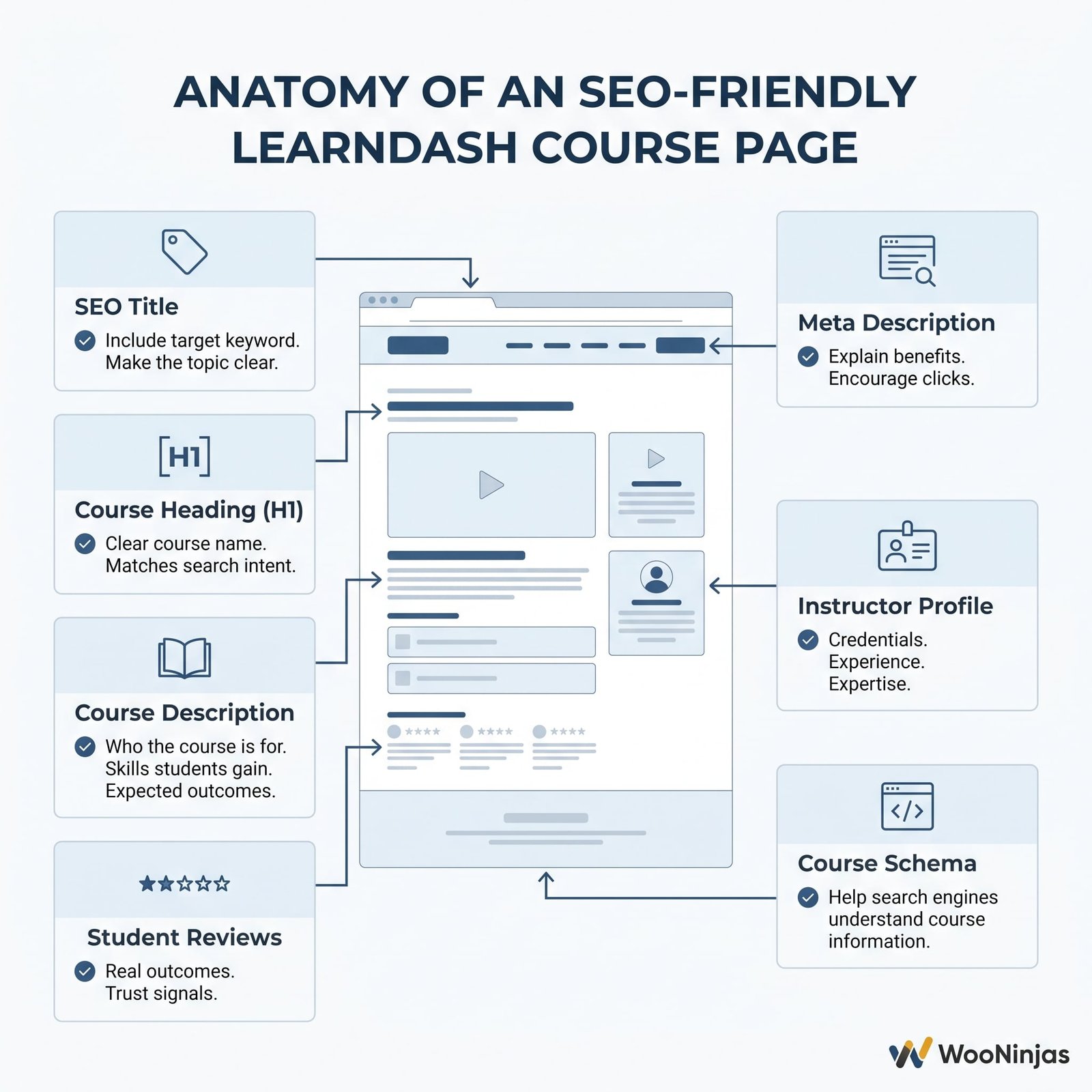
Your LearnDash course pages are some of the best eLearning SEO assets you have on your website. Many course creators write descriptions only for enrolled students, but an optimised course page needs to help both search engines to understand the content and potential students to decide whether the course is right for them.
- Title tag: Include the main keyword naturally near the beginning and keep it around 60 characters or fewer. A specific title such as “Python for Beginners Certificate Course” is clearer for both search engines and users than a vague title like “Python Basics”.
- Meta description: Write a clear 140–160 character summary that explains what students will learn and why the course is valuable. Include the primary keyword naturally to improve search result relevance and encourage clicks.
- Course description:
- H1 Heading: Use a clear, keyword-focused course title as the H1. LearnDash typically uses the course title for this heading, so make sure it describes both the topic and the learner’s goal.
- Image alt text: Add descriptive alt text to course images that explains what the image shows and includes relevant course context where appropriate. This helps accessibility and allows search engines to better understand visual content.
Core Web Vitals: The Technical eLearning SEO Layer You Cannot Ignore
Core Web Vitals are one of Google’s page experience signals, and they measure how users experience your website in terms of loading speed, responsiveness and visual stability. As of March 2024, Google replaced First Input Delay (FID) with Interaction to Next Paint (INP), and LCP, INP, and CLS are now the three active Core Web Vitals metrics.
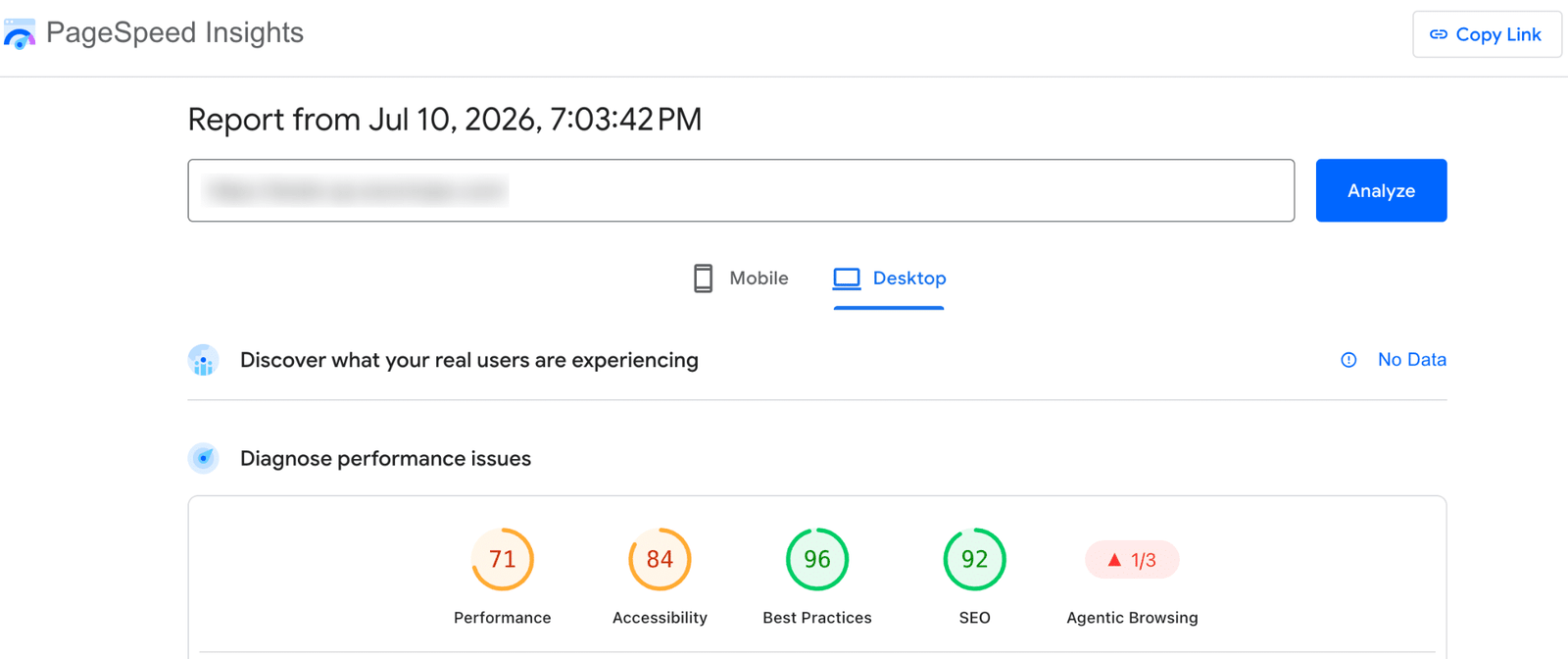
eLearning websites often have Core Web Vitals issues due to course-specific features like large images, interactive quizzes, multiple plugins, and complex course layouts. Enhancing these elements can result in a quicker and more seamless experience for both students and search engines.
The Core Web Vitals report in Google Search Console will help you find site-wide issues, and PageSpeed Insights can be used to test individual pages. Common fixes for LearnDash and WordPress sites are to use a lightweight theme, optimise images, remove unnecessary plugins, enable caching and serve static files via a CDN.
| Ask any eLearning platform: when did you last check your Core Web Vitals? Most LearnDash sites we audit are failing LCP or INP on mobile, costing them ranking positions they have earned on content quality alone. WooNinjas eLearning SEO services are built specifically for LearnDash platforms: we run the technical audit, fix what is dragging your scores down, then build the content and keyword strategy on top of a foundation that Google can actually reward. |
E-E-A-T Signals That Build Trust for eLearning Websites
E-E-A-T stands for Experience, Expertise, Authoritativeness, and Trustworthiness. Google’s own Quality Rater Guidelines state that trust is the most critical signal: untrustworthy pages have low E-E-A-T regardless of how expert or authoritative they appear. Google has added Experience as another quality consideration to help find content created by people who have firsthand knowledge of a topic.
For eLearning sites, E-E-A-T is both a challenge and an opportunity. Generic course pages with thin descriptions and no author information look like low-quality content to Google’s ranking systems. But course creators have an ideal position to demonstrate all four signals authentically.
Experience and Expertise
Add a detailed instructor biography to every course page and blog post. Include credentials, years of experience, publications, speaking engagements, or professional certifications. Show that you have actually done the thing you teach: case studies, student outcome data, and specific results signal first-hand experience. Generic ‘this course will teach you’ language provides no E-E-A-T signal whatsoever.
Authoritativeness and Trustworthiness
Authority is built externally. Student reviews on Google Business Profile, mentions from industry publications, backlinks from related educational sites, and accreditation references all contribute. Claim your Google Business Profile and actively encourage enrolled students to leave reviews. Even a modest number of verified reviews from real students significantly strengthens authority signals.
Looking for a Ready-Made Solution?
Explore our WordPress, WooCommerce, and LMS plugins built to extend functionality without custom development.
For trustworthiness: use HTTPS, publish a clear privacy policy and terms of service, display contact information prominently, and add a refund policy. These signals tell both users and search engines that a real, accountable business is behind the platform.
Course Schema Markup for eLearning SEO
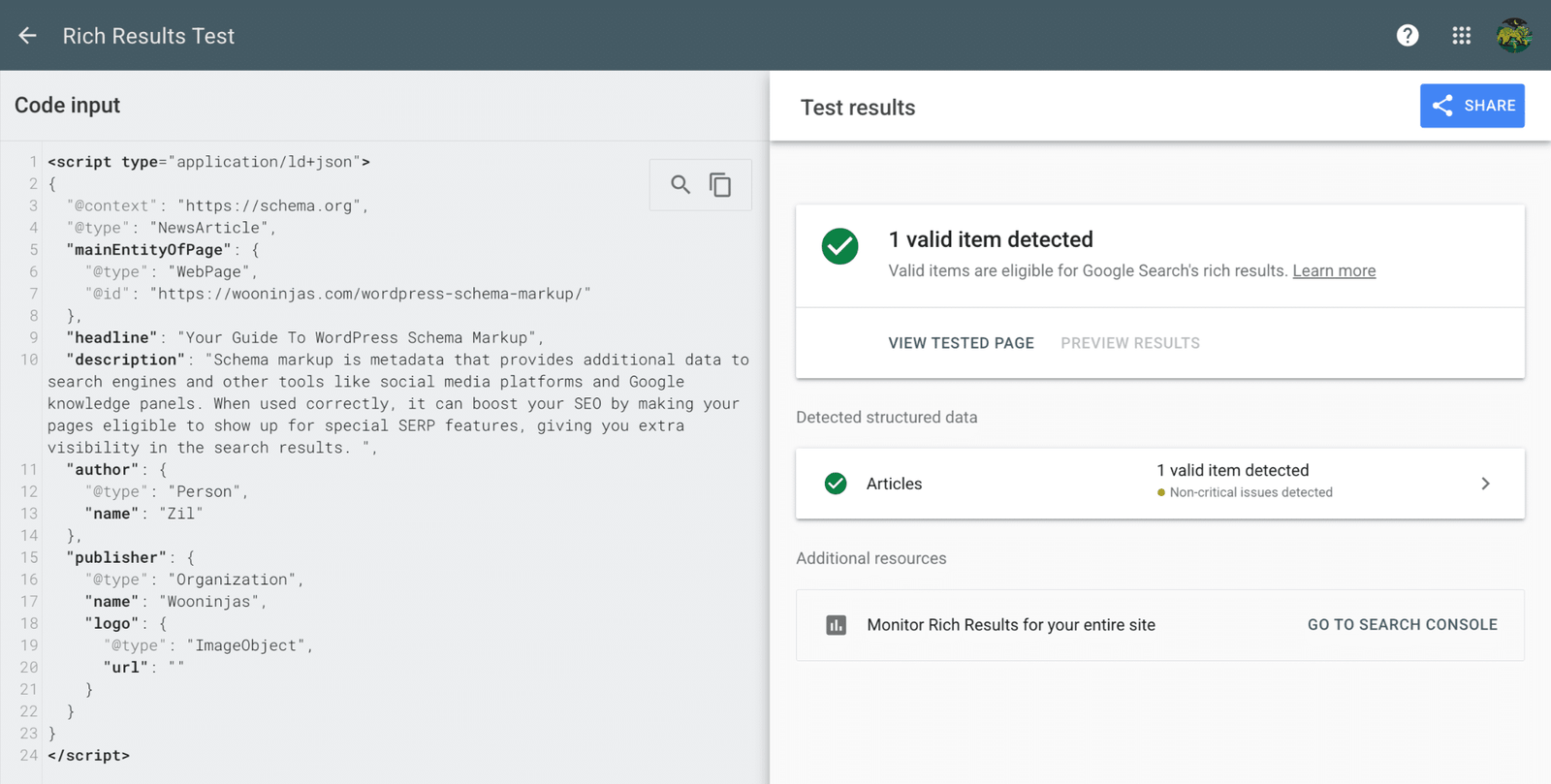
Schema markup is structured data added to your course pages to help search engines better understand your content. When done right, it offers additional context about your courses and can help increase eligibility for enhanced search features in search results.
The course schema includes fields for course name, description, provider, URL, price, course mode (online or in-person), and educational level. When implemented correctly, this markup increases the chance that course information appears in AI-generated responses from tools like Google AI Overviews.
On WordPress with LearnDash, course schema can be implemented through an SEO plugin (Rank Math includes a built-in Course schema type in its free version) or via custom setup in your theme. Implement schema on every published course page at a minimum. The FAQPage schema type is also worth adding to course FAQ sections, as AI systems extract direct answers from FAQ content heavily.
Content Marketing as an eLearning SEO Funnel
Course pages capture students who already know what they want. A blog strategy captures students in the research phase and moves them toward enrolment. Every blog post should connect to a relevant course in your catalogue. A post about ‘the five most in-demand web development skills’ should link to your web development courses. The blog becomes a discovery layer for the course catalogue.
- Write for your student audience first. Answer real questions they are searching for, in language that matches their level.
- One way to keep your content fresh is to update your existing content, which can be a useful way to improve performance on topics that change often.
- Use structured headings (H2, H3) to make content scannable. Keep paragraphs short. Break up long explanations with bullet points.
- Add a clear call to action at the end of every post, connecting the topic to the relevant course. Do not assume readers will navigate to your courses independently.`
Student Reviews and Social Proof as eLearning SEO Signals
You can see how student testimonials and reviews serve two important purposes. They convert uncertain prospects into paying students, and they help demonstrate trust and credibility, which are important parts of a strong eLearning website.
Google Business Profile reviews are particularly valuable because they appear in local and branded search results and are explicitly referenced in Google’s Quality Rater Guidelines as a trust signal. Claim your profile, encourage students to review, and display testimonials directly on course pages with names, photos, specific outcomes, and dates. Generic quotes without specifics provide minimal trust signal value.
AI-Powered Search and eLearning SEO
AI overview search is changing the way users find information. Search engines and AI tools are increasingly dependent on well-structured, credible content to process and summarise answers. By providing clear information about courses, answering common questions of learners and maintaining a solid technical foundation, eLearning sites can increase their visibility.
- Write FAQ sections on every course page and blog post. AI systems extract direct answers to specific questions, and FAQ content formatted with H3 question headings and concise paragraph answers is ideal for this extraction.
- Implement the FAQPage schema on all FAQ sections to make the structure machine-readable.
- Use specific, factual language. AI tools tend to cite sources that contain clear, verifiable statements over vague general claims.
- Build brand consistency. If your brand name, instructor name, and platform URL appear consistently across your site, your Google Business Profile, and external mentions, AI systems can more confidently attribute content to your platform.
| PRO TIP: The fastest eLearning SEO win that most course creators overlook is treating each course page as a standalone content asset. Most course pages have thin descriptions written for enrolled students, not for search. Rewrite each course page description to 300 to 500 words that answer ‘who is this course for and what will they achieve,’ add one student outcome testimonial, implement Course schema markup, and check Core Web Vitals. A well-optimised course page can rank for relevant searches while supporting your wider content strategy. |
Conclusion
eLearning SEO is a set of overlapping practices you maintain over time rather than a task you complete once. The areas where most course creators are behind: Core Web Vitals, E-E-A-T signals, course schema markup, and AI search visibility. Closing those gaps is where the fastest near-term ranking improvement comes from, because these are the areas competitors have not yet addressed.
Start with a Core Web Vitals check in Google Search Console. If your site is failing LCP or INP on mobile, fixing it lifts every page simultaneously. Then review your course pages for E-E-A-T signals: instructor biographies, student outcomes, reviews, and schema markup. For sites that need a managed approach, our eLearning SEO service handles all of this specifically for LearnDash platforms.
| Get more students finding your LearnDash courses through search. Our eLearning SEO service, run in partnership with InflowLabs, covers monthly keyword research targeted to your course topics, course page optimisation, Core Web Vitals and site speed improvements, Google Analytics 4 and Search Console reporting, and a content strategy that connects blog traffic directly to course enrolments. For course creators who want to know where to start before committing to a monthly engagement, an initial SEO audit is available. Contact us via the WooNinjas contact page to request one. |
Frequently Asked Questions
How long does eLearning SEO take to show results?
Most eLearning SEO improvements take 3-6 months to show noticeable results. Keywords with low competition will rank faster, while keywords with high competition can take 6-12 months. Technical fixes, such as Core Web Vitals fixes may show an impact when Google recrawls your site.
Does LearnDash itself affect my eLearning SEO performance?
LearnDash does not directly help or hurt SEO. Your content, metadata, site structure and performance determine the rankings. However, quizzes and course tracking in LearnDash can impact speed, so be sure to use a lightweight theme and caching tools to keep Core Web Vitals strong.
What is the most important eLearning SEO action to take right now?
Start with a strong technical foundation for your course site. Look at Core Web Vitals, optimise your course titles and descriptions, and add structured data like Course and FAQ schema to help search engines understand your content better. For example, a WordPress schema markup plugin can make it easier to add and manage schema on your site.
Should I use Yoast SEO or Rank Math with LearnDash for eLearning SEO?
Both plugins take care of LearnDash SEO basics. Benefits of using Rank Math for course sites are that the free version already supports course schema. Pick the plugin that suits your workflow and schema needs.
How does E-E-A-T specifically affect eLearning SEO?
E-E-A-T helps Google understand if your course platform is trustworthy. Show your true expertise with instructor profiles, credentials, student reviews, case studies and transparent business information.
Need Ongoing WordPress Maintenance & Support?
We handle updates, performance monitoring, security hardening, and technical fixes so your WordPress and WooCommerce site stays stable and secure.

What MCP for LMS Actually Does on Your Course Platform
Connect AI assistants to your LMS with MCP for LMS. See how LearnDash, Moodle, Canvas, and Docebo compare, and what…
Read More...
Moodle to LearnDash: What Actually Transfers and What You’ll Rebuild
A step-by-step Moodle to WordPress migration guide. See what moves to LearnDash, what you rebuild, how long it takes, and…
Read More...
LMS Migration: Move Courses, Users, and Learner Data Safely
Planning an LMS migration? Learn how to move courses, users, and data safely with a step-by-step guide from WooNinjas.
Read More...
