How to Build a Full-Featured B2B WooCommerce Store (2026 Guide)
Learn how to build a B2B WooCommerce store with wholesale pricing, customer roles, quote requests, and a step-by-step setup guide in 2026.
Selling wholesale to customers is not the same as running a traditional online store. Business buyers often require negotiated prices, limited product catalogs, bulk ordering, and faster reordering. WooCommerce offers a solid e-commerce base, but these workflows generally need additional plugins or custom development. Businesses starting from scratch can simplify the initial setup with WooCommerce Quick Launch.
The good news: the B2B WooCommerce plugin ecosystem has matured significantly. In 2026, a well-configured WooCommerce store can match a purpose-built B2B platform at a lower cost while keeping the ownership advantages that make WooCommerce worth choosing.
What Makes a B2B Store Different From B2C
The key differences affecting a B2B WooCommerce setup: buyers need role-based pricing; many products require quote-based purchasing; catalog access should be restricted to approved buyers; and repeat buyers need fast reordering. Each requirement maps to a specific step in this guide.
Why WooCommerce Works for B2B
WooCommerce is an open-source platform that offers a lot of flexibility, giving you full control over user roles, product visibility, pricing logic, and checkout flow. The platform has no plan limits, no per-transaction fees, and no caps on the number of products, customer groups, or pricing rules you can create. This feature is important for a B2B WooCommerce store because wholesale pricing structures can be complex, and a platform that charges you more as you add rules or customer segments becomes expensive quickly. WooNinjas offers a range of WooCommerce services for companies that are building, scaling, and maintaining e-commerce stores.
2026 Platform Note: HPOS and Block Checkout
As of WooCommerce 10.x (2025), two significant platform changes affect WooCommerce stores. First, High-Performance Order Storage (HPOS) is now the default for new stores. HPOS replaces the legacy WordPress post meta table with dedicated database tables for orders, delivering much faster order query performance at scale. Every plugin you add to a B2B store should be verified as HPOS-compatible before installation.
Block-based cart and checkout are also now the default in WooCommerce 10.x. Some older B2B plugin features, particularly custom fields at checkout, may need updates to work with block checkout. All plugins in this guide are compatible with both HPOS and block checkout in their current versions. Always test on staging first.
If you’re upgrading an older store, running a WooCommerce technical and security audit before introducing wholesale plugins can help identify compatibility issues with existing extensions, checkout customizations, and payment gateways.
Must-Have Features for Any B2B WooCommerce Store
Before choosing plugins, identify which B2B WooCommerce features your store needs. The core five:
- Role-based pricing: different prices for wholesale, distributor, VIP, and retail customers from the same product catalog.
- Tiered pricing: per-unit price drops as quantity increases, encouraging bulk orders.
- Access control: prices, products, or entire catalog sections visible only to approved, logged-in buyers.
- Request a Quote: a workflow for buyers to request custom pricing on large or non-standard orders instead of purchasing immediately.
- Reorder: a fast way for repeat business buyers to place the same order again without navigating product pages.
Stores with more complex requirements, such as multiple buyers per company account, VAT exemption handling, or NET 30/60/90 invoice payment terms, should review the alternatives section at the end of this guide before committing to the stack described in the steps below.
Step-by-Step: Building Your B2B WooCommerce Store
Step 1: Set Up a Basic WooCommerce Store
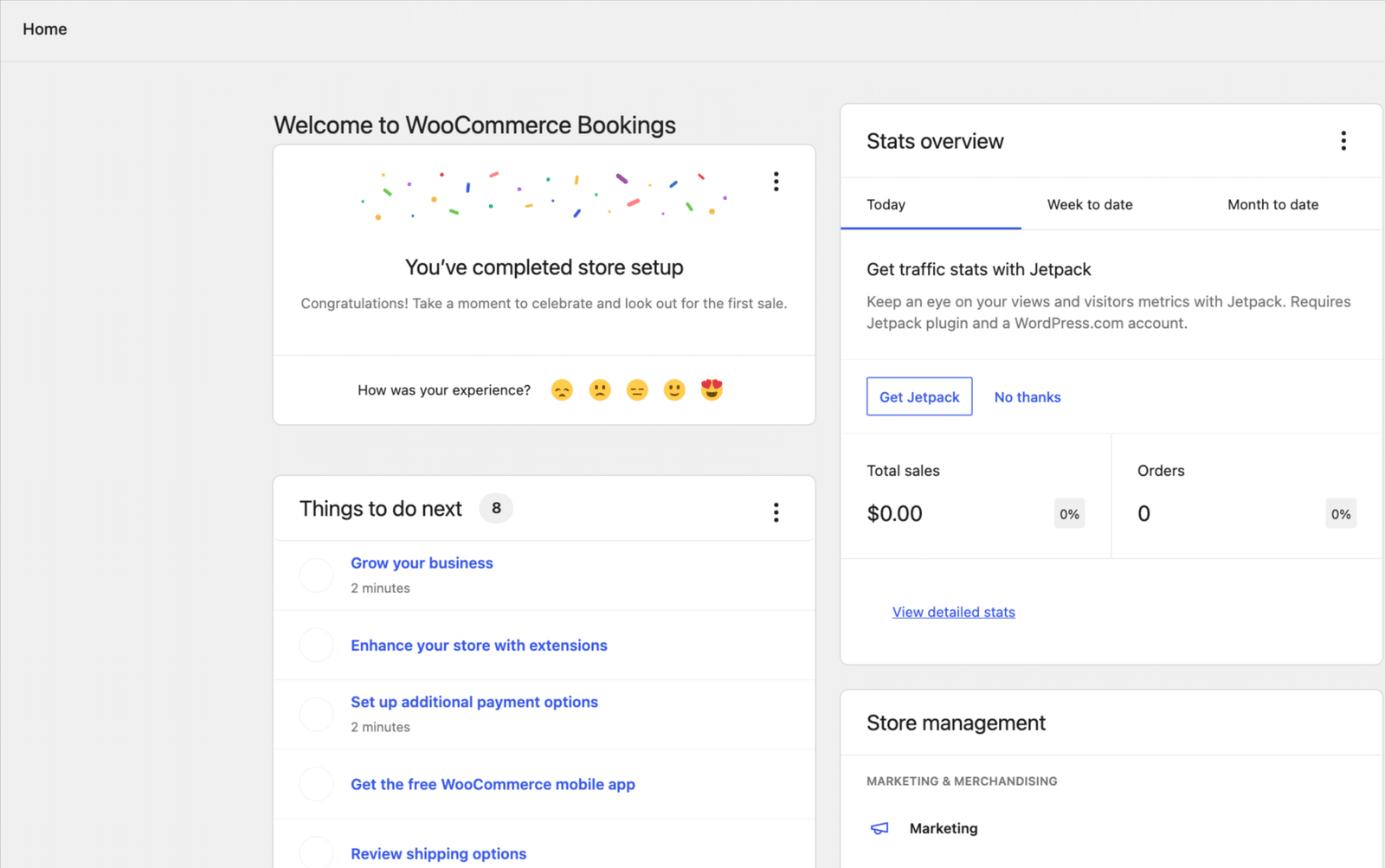
Before adding any B2B WooCommerce features, you need a functioning WooCommerce installation. Install WooCommerce from the WordPress plugin directory and complete the setup wizard: add your store details, configure payment gateways (bank transfer and Stripe cover most B2B use cases), set your shipping zones, and publish at least a representative product to test against.
If you’re migrating from another e-commerce platform, complete the migration first before introducing wholesale pricing rules and customer roles. Many businesses migrate from Shopify, Magento, or other e-commerce platforms and often begin with WooCommerce migration before adding wholesale.
Step 2: Control Who Sees What With Advanced Access Manager
Install Advanced Access Manager (AAM) from the WordPress plugin directory. AAM is free and gives you granular control over content access by user role. For a B2B WooCommerce store, this means you can restrict product pages, pricing pages, and entire sections of the site to approved wholesale buyers only, and redirect unapproved visitors to a login or registration page.
Create a dedicated B2B user role through AAM > Roles > Add Role. Name it something clear, like b2b-buyer or wholesale. This role becomes the gating mechanism for all B2B-specific content. Once created, you can restrict any page, post, or product to this role only.
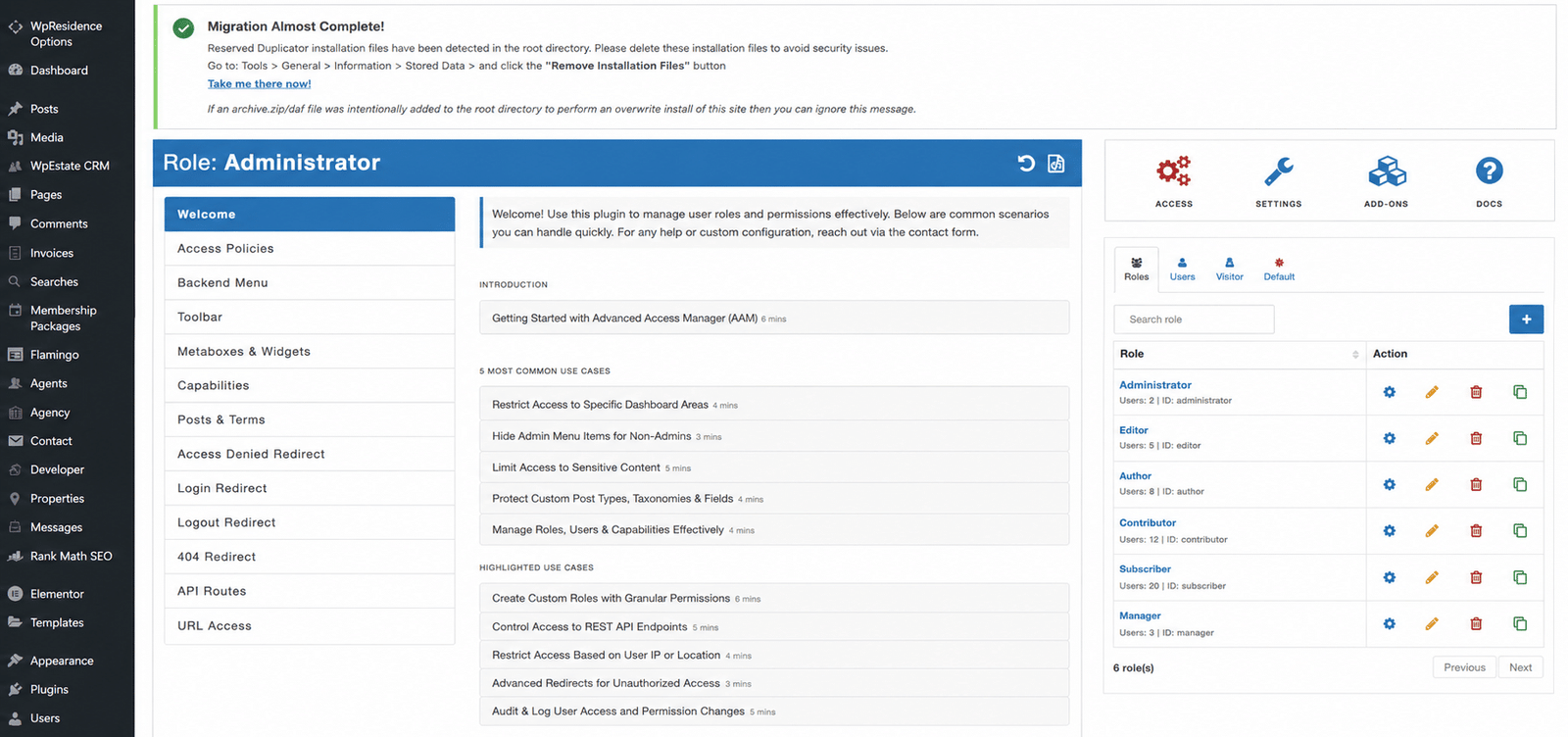
To restrict a page or product, open it in the editor, scroll to the AAM Meta Box, and under Access Control, set Grant Access to your B2B role only. Uncheck all other roles. Anyone without the B2B role cannot view the content, even if logged in.
To hide restricted menu items from non-B2B visitors: go to Appearance > Menus, find the menu item, and use AAM Menu Manager to set visibility to your B2B role only. Regular visitors will not see the menu entry. B2B buyers who are logged in with the correct role will see it normally.
Step 3: Enable Wholesale and Tiered Pricing With WholesaleX
Install WholesaleX from the WordPress plugin directory. The free version covers wholesale pricing and user role management. WholesaleX Pro starts at $96 per year for a single site (currently discounted from $129) and adds Request a Quote, Wallet, Subaccounts, Bulk Order Form, and Conversation, making it an all-in-one B2B WooCommerce suite rather than a pricing-only plugin.
After activating WholesaleX, create your wholesale user role inside the plugin rather than through AAM. WholesaleX has its own role management system that connects directly to its pricing engine. Create roles for each of your customer segments: wholesale, distributor, retailer, or whatever your business uses. Each role gets its own pricing configuration.
Looking for a Ready-Made Solution?
Explore our WordPress, WooCommerce, and LMS plugins built to extend functionality without custom development.
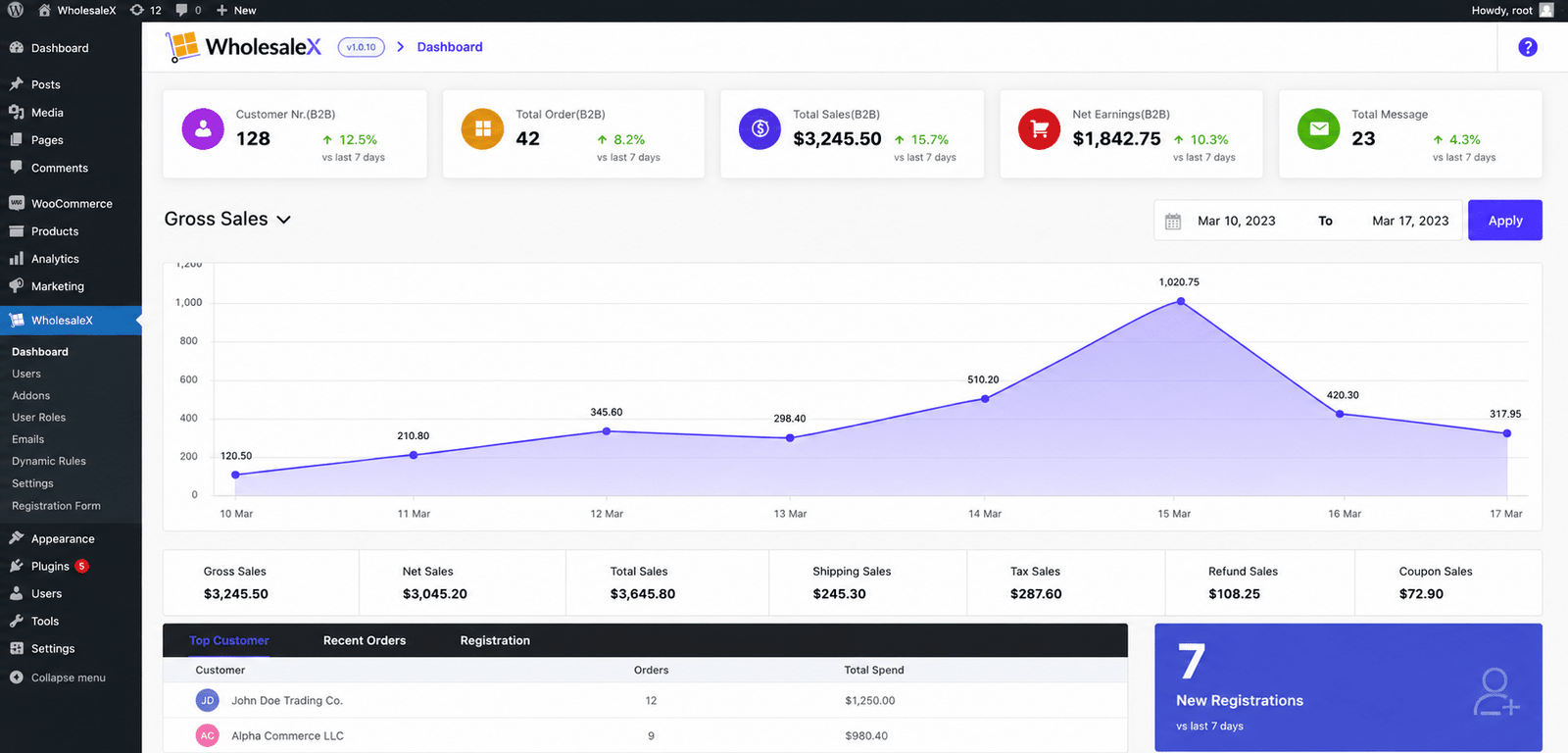
Set tiered pricing globally via the WholesaleX rules engine or per product. Example: 1 to 9 units at standard wholesale price, 10 to 49 units at 10% below, 50 or more units at 20% below. WholesaleX displays pricing tiers on the product page so buyers see break points before ordering.
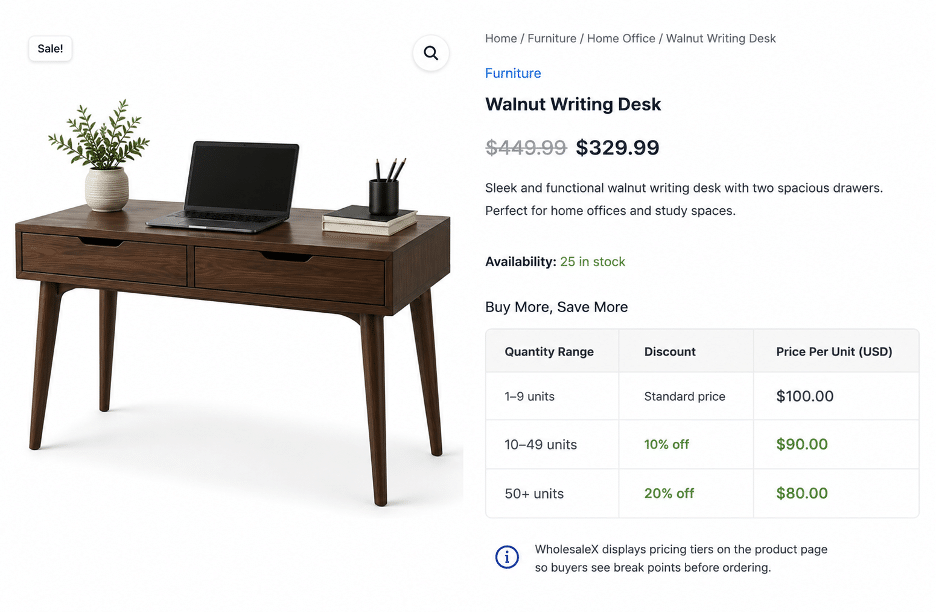
WholesaleX also supports catalog mode: it disables purchasing and shows only a quote button. Useful for B2B WooCommerce stores not yet ready to sell directly online, or for product lines where pricing is always negotiated.
Step 4: Add a Request a Quote Workflow
Install YITH Request a Quote for WooCommerce (v4.40.0, released February 2026, requires WooCommerce 10.3+) if you need dedicated quote management. The free version lets customers add products to a quote list and submit a request form.
The plugin replaces Add to Cart with an Add to Quote button on selected products or across the catalog. Customers build a quote list and submit a request form. You receive an email, review it, and reply with a custom quote. The premium version adds PDF quotes, admin-side quote creation, and quote expiration dates. For a B2B WooCommerce operation where negotiation is a normal part of the sales process, the premium version is worth the investment.
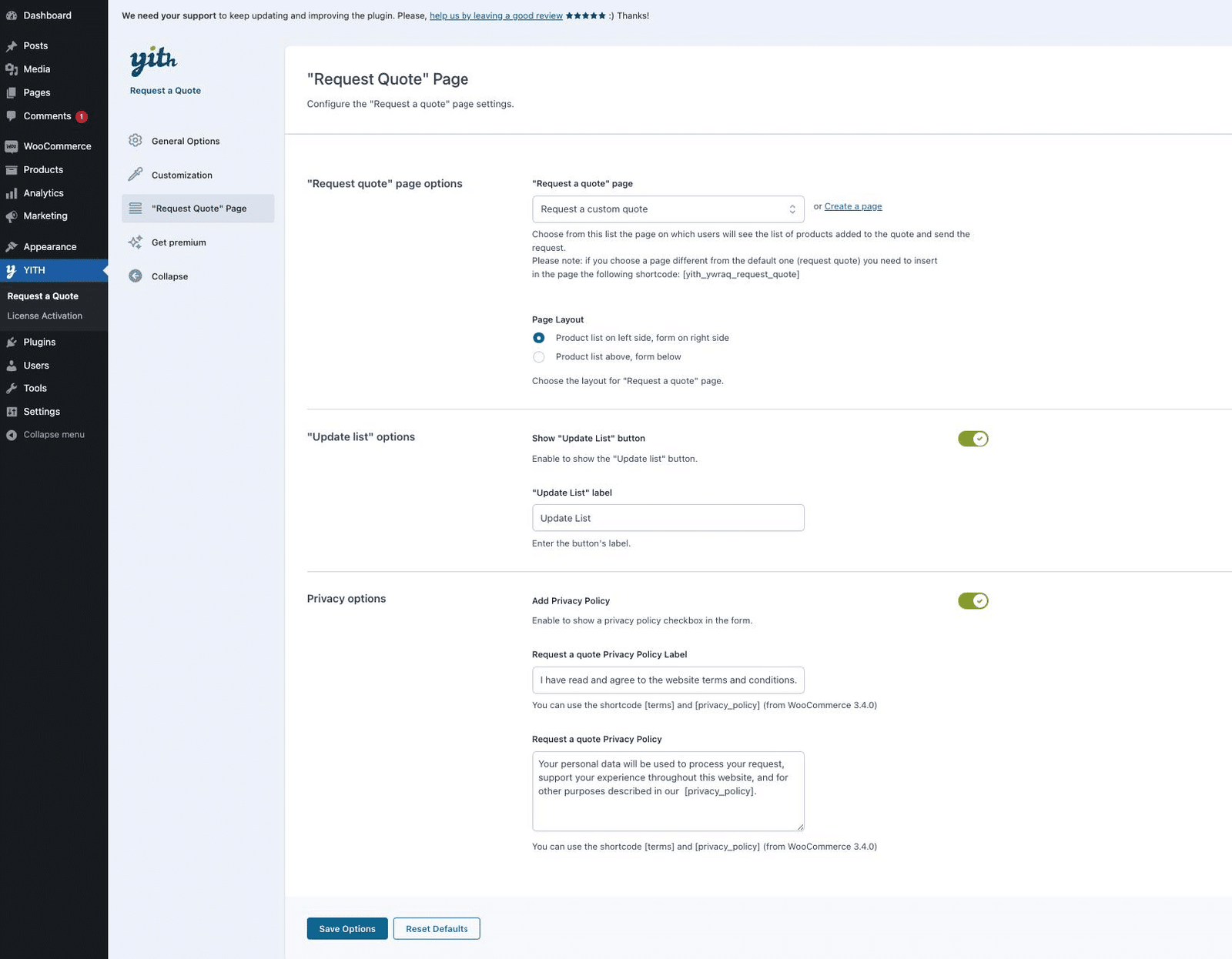
If you already use WholesaleX Pro and its built-in quote system meets your needs, you can skip this step. The two plugins can coexist if needed, but running two separate quote systems on the same store creates unnecessary complexity for both administrators and customers.
| Already running a WooCommerce store and need B2B features added without disrupting what’s working?WooNinjas has built B2B WooCommerce setups across 700+ stores. Our WooCommerce customization team can configure role-based pricing, quote workflows, and access restrictions on your existing store without disrupting your current retail operation. And our WooCommerce maintenance plans keep your B2B plugins updated and tested monthly, so pricing rules and checkout flows do not break between updates. |
Step 5: Let B2B Buyers Reorder With One Click
Install Repeat Order for WooCommerce from the WordPress plugin directory. This free plugin adds a Repeat Order button to the customer account order history. When a B2B buyer clicks it, the plugin instantly adds all items from that previous order to the cart. For wholesale customers who place the same order weekly or monthly, this feature eliminates the time spent navigating product pages and entering quantities again.
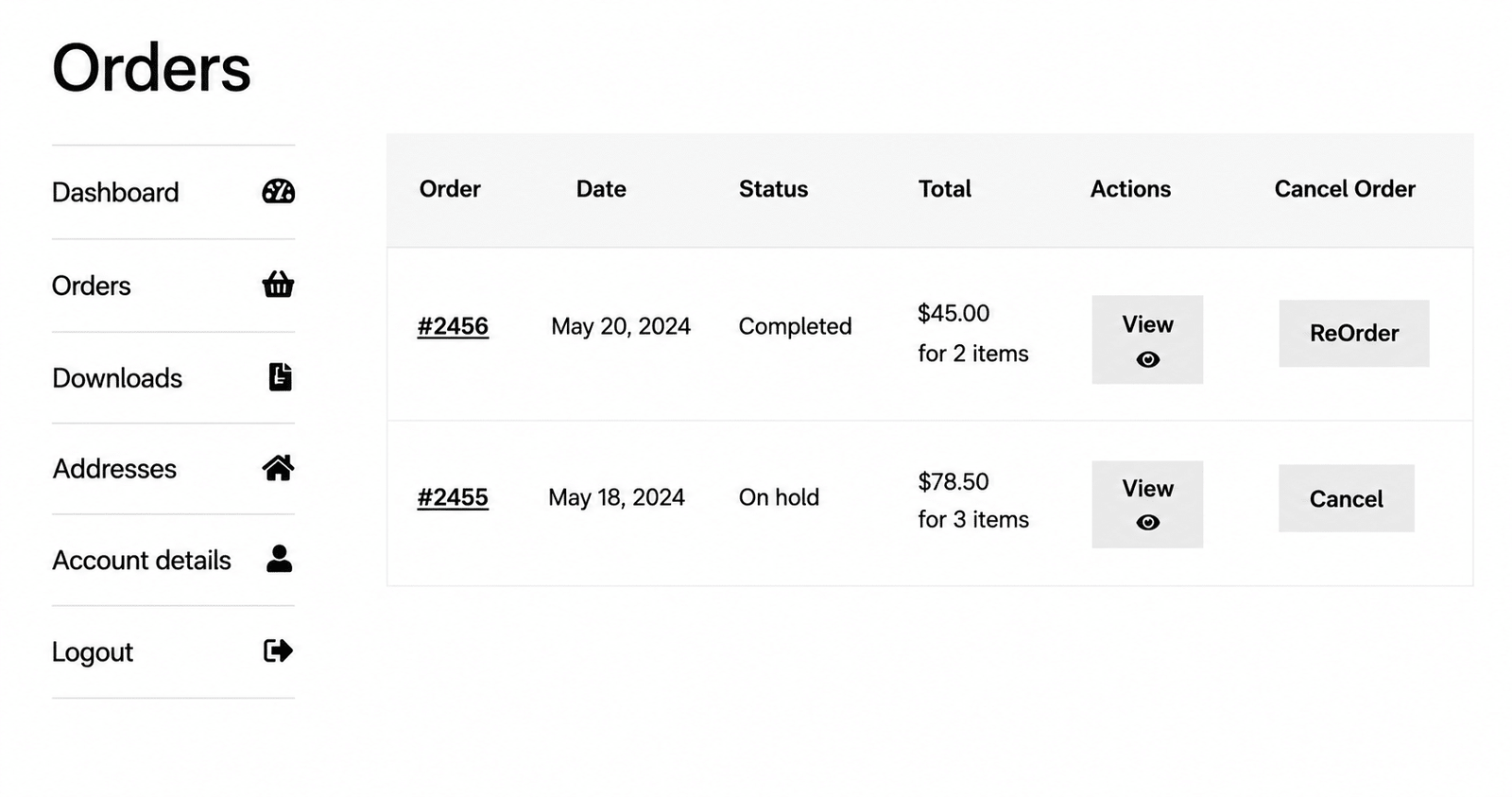
Once the plugin is activated, a Repeat Order button will automatically appear in My Account > Orders for each completed order. No configuration is required for basic use. The plugin also supports multiple button placement options, discount incentives for repeat orders, and status-based eligibility controls.
This is particularly useful for distributors and repeat wholesale customers who regularly purchase the same products throughout the month.
Conclusion
Building a B2B WooCommerce store in 2026 is simpler than it was some years ago if you select the right tools from the beginning. Most wholesale businesses need day-to-day workflows that can be supported by a combination of role-based pricing, catalog restrictions, quote requests, and repeat ordering all within a single WooCommerce store.
Run tests with different customer roles and check if all plugins are compatible with HPOS. Make sure your pricing and checkout workflows are working as expected before you launch. If your business needs more advanced features like ERP integrations or custom wholesale workflows, contact WooNinjas to talk about the best way forward for your store.
A wholesale store does not remain reliable after the launch. Regularly updating plugins, testing compatibility, and checking out reduces pricing problems and unexpected downtime. WooNinjas’ WooCommerce Maintenance Plans are ongoing maintenance plans for stores that are using WooCommerce as their daily business platform.
| Planning to build or expand a WooCommerce store for B2B? Whether you are starting a new wholesale store, integrating B2B functionality into an existing WooCommerce site, or need custom functionality that goes beyond off-the-shelf plugins, WooNinjas can assist. Check out our WooCommerce Quick Launch service for new stores, work with our WooCommerce customization team for custom solutions, or contact WooNinjas to discuss your project. Our WooCommerce maintenance plans help keep your store running smoothly with ongoing updates and testing, ensuring your plugins, pricing rules, and checkout are working correctly once your store goes live. |
Frequently Asked Questions
Does WooCommerce have built-in B2B features in 2026?
No. WooCommerce does not include B2B functionality such as wholesale pricing, role-based pricing, quote requests, restricted catalogs or bulk ordering. You can use WooCommerce B2B plugins or custom development to add these features. The built-in user roles in WooCommerce are the basis on which you can manage business customers.
What is HPOS, and why does it matter for my B2B store?
WooCommerce’s high-performance order storage (HPOS) is the new order storage system that enhances database performance and order processing. Since this option is the default for new WooCommerce stores, make sure any B2B plugins, payment gateways, and other extensions you plan to install support HPOS.
Is WholesaleX better than B2BKing for a standard wholesale store?
The best choice depends on your specific needs. WholesaleX is a suitable option for most small to medium-sized wholesale stores as it combines wholesale pricing, quantity discounts, quote requests, and bulk ordering in a single plugin. B2BKing is more geared towards businesses that need features like company accounts, VAT support, purchase orders, and granular user permissions.
Do I need a separate quote plugin if I use WholesaleX Pro?
Not all the time. WholesaleX Pro has a built-in Request a Quote feature that will be enough for many wholesale stores. You only need a dedicated plugin like YITH Request a quote if you want to add more advanced features like PDF quotes, admin-created quotes, approval workflows, or advanced quote management.
Can I run B2B and retail customers on the same WooCommerce store?
Yes. WooCommerce allows you to manage wholesale and retail customers from the same store using customer roles, role-based pricing, and catalog visibility rules. With this method, you can keep one product catalog but show different prices, products, or buying options to different groups of customers.
Need Ongoing WordPress Maintenance & Support?
We handle updates, performance monitoring, security hardening, and technical fixes so your WordPress and WooCommerce site stays stable and secure.
5 LLM SEO Tools Worth Trying for Your WordPress Site in 2026
Compare the best LLM SEO tools for WordPress in 2026: Peec AI, Otterly AI, Profound, Rankability, and AthenaHQ. Find the…
Read More...
WordPress MCP Plugin vs MCP Adapter: Which One Fits Your Site
WordPress MCP Plugin vs. MCP Adapter: a plugin is fast to install, the adapter is official and built on the…
Read More...
Managing WooCommerce Products with MCP: Add, Update & Sync via AI
See how a WordPress MCP server lets AI add, update, and sync WooCommerce products, what's possible today, and where the…
Read More...
