Why WordPress Maintenance Matters & the Checklist to Keep Your Site Running
Setting up a WordPress site is the easy part. Keeping it secure and fast takes ongoing work. Here's why maintenance matters and what to check first.
Launching a WordPress site is only the beginning of managing a successful online presence. Like any other software, WordPress websites require ongoing attention to stay updated, secure, and fully functional.
The real job is to maintain the website. Regular website maintenance makes your website fast, reliable, and safe to browse.
Regular WordPress maintenance helps prevent common issues such as security vulnerabilities, slow performance, broken features, and unexpected downtime. By keeping your website properly maintained, you can ensure a smoother experience for both you and your visitors.
In this guide, we will go through the key reasons why WordPress maintenance matters and how to keep the website maintained regularly to protect the website, improve performance, solve common issues, and keep it running smoothly every time.
Quick Answer
WordPress maintenance means regularly updating WordPress core, plugins, and themes, running backups, monitoring security, and checking site speed. Skipping it causes security vulnerabilities, slow load times, and downtime. Do updates and security checks weekly. Do database cleanup and performance reviews monthly.
Why Regular WordPress Maintenance Is Essential
WordPress maintenance refers to the ongoing process of managing, updating, and optimizing a WordPress website to keep it secure, functional, and performing well. It includes tasks such as updating WordPress core, plugins, and themes, creating backups, monitoring security, optimizing performance, and checking for technical issues.
A WordPress website is not something you install once and leave untouched. Regular updates and monitoring are necessary because WordPress core, themes, and plugins continue to evolve. They continue to update over time. Without proper maintenance, outdated plugins can cause compatibility issues, slow down your website, block some existing features, and prevent security updates.
Routine maintenance helps to catch and correct any problems before they become big problems. It tackles weaknesses, boosts website performance and dependability, and ensures that all the elements of your WordPress website continue to function harmoniously, reducing security threats.
10 Reasons Why WordPress Maintenance Is Important
1. Protects Your Website From Security Threats
WordPress maintenance is the process of regularly updating, monitoring, and optimizing your website to keep it secure, fast, and reliable. It includes tasks like WordPress updates, plugin and theme management, backups, and performance checks.
Regular WordPress maintenance includes security monitoring, malware scanning, and vulnerability checks to identify potential threats before they damage your website. Monitoring suspicious activity and updating security measures helps reduce risks and protect your website from attacks.
Regular maintenance is important because WordPress websites constantly evolve with new updates & technologies. Ongoing maintenance of WordPress sites prevents compatibility issues, broken features, and outdated plugins and theme problems.
By maintaining a WordPress website regularly, website owners can reduce risks, improve website performance, and ensure their site continues to provide a smooth experience for visitors.
2. Keeps Your Website Fast and Optimized
Regular WordPress maintenance helps improve website speed and overall performance. Tasks like performance checks, database cleanup, and optimization remove unnecessary data and keep your site running efficiently.
A slow website can affect user experience, search rankings, and conversions. By regularly monitoring and optimizing your WordPress site, you can ensure faster loading times and smoother performance for visitors.
3. Prevents Unexpected Website Downtime
Website downtime can affect visitors, sales, traffic, and your online presence. When your website is down, visitors are frustrated and are seeking another option. Regular WordPress website maintenance helps identify issues early, fix problems, and reduce the chances of unexpected website crashes or errors.
Updates and routine checks can help you solve potential problems before they affect your website. Uptime monitoring will help keep your site up and reliable.
4. Ensures WordPress, Plugin, and Theme Compatibility
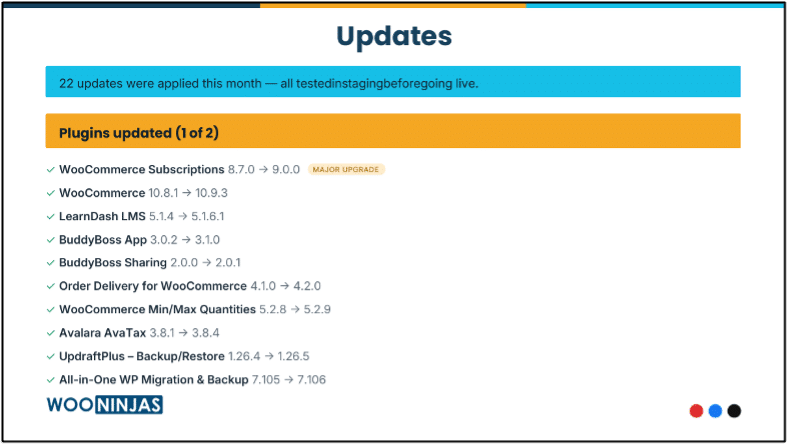
WordPress websites rely on multiple components working together, including the core software, plugins, and theme. If software, plugins, and themes are incompatible with each other, it will increase the chances of upcoming site crashes, bugs, and security vulnerabilities.
Before applying major plugin or theme updates, testing changes in a staging environment helps identify compatibility issues and prevents broken layouts, errors, or functionality problems on the live website.
Regular maintenance ensures these elements remain compatible after updates and changes. Keeping everything updated helps your website function smoothly.
5. Protects Your Website Data With Regular Backups
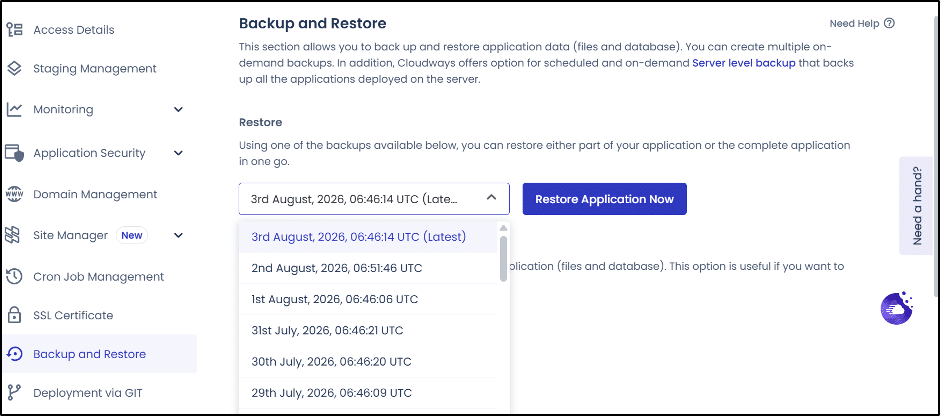
Regular backups are an essential part of WordPress website maintenance because they keep your website data secure. If your site experiences security issues, failed updates, or any technical error, backups allow you to restore to the last version.
A reliable backup strategy provides an extra layer of protection and reduces the risk of losing important website content, customer data, user data, themes, plugins, design, or configurations.
Many hosting providers, Hostinger, GoDaddy, and Namecheap, offer automated backup options, but website owners should also maintain independent backups to ensure their data can be restored when needed.
6. Helps Maintain Better SEO Performance
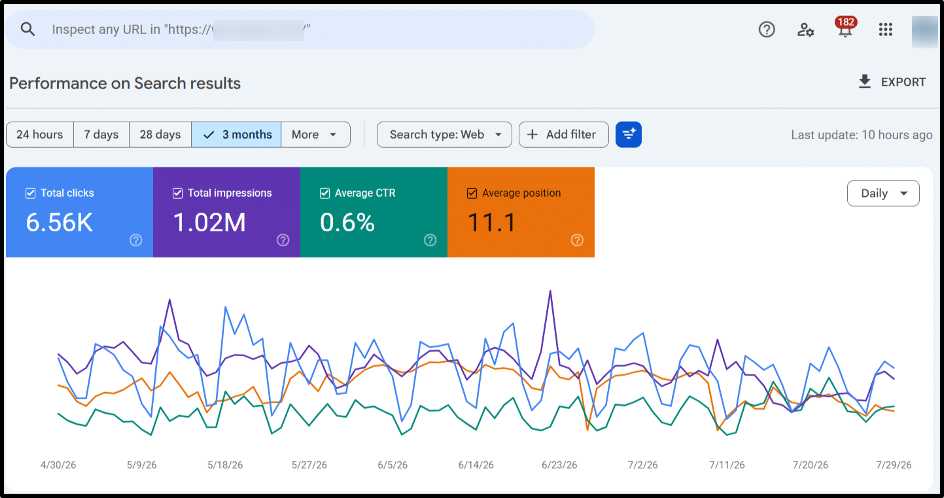
Regular maintenance helps keep your website technically optimized so search engines can crawl and understand your content effectively. A well-maintained website with regular updates, improved speed, and resolved technical difficulties is easier for search engines to crawl, understand, and rank. These improvements also support your WordPress SEO efforts by keeping your website structure, performance, and technical health optimized for better visibility.
Regular maintenance includes checking broken links, monitoring Core Web Vitals, and performing technical SEO checks. Resolving these issues improves crawlability, page experience, and search performance.
Website performance issues such as slow loading times, poor Core Web Vitals, JavaScript rendering problems, large image files, inadequate hosting, outdated plugins, heavy themes, and an overloaded media library can negatively affect your website’s visibility.
If you’re unsure which WordPress hosting is best for your needs, this guide on WordPress hosting will be very helpful.
Regular maintenance helps identify and resolve these issues to keep your website technically healthy.
Website speed also directly impacts user experience and search performance. According to the report, 53% of mobile visitors leave websites that take too long to load, so optimization is essential for retaining them. By maintaining your WordPress website regularly, you can improve loading speed, uptime, and overall performance, creating a better experience for both users and search engines.
7. Improves Website User Experience
A properly maintained website provides visitors with a smoother and more reliable experience. Regular checks ensure that pages load correctly, forms work properly, and website features remain functional.
When users can easily navigate and interact with your website, they are more likely to stay longer and engage with your content.
8. Saves Time and Reduces Long-Term Costs
Ignoring website maintenance can lead to bigger issues that require expensive repairs. Regular maintenance helps detect and resolve small problems before they turn into major technical challenges.
By investing time in regular maintenance, website owners can avoid unexpected costs and reduce the effort needed for emergency fixes. Ongoing maintenance helps identify potential issues early, keeping your website stable and reliable.
A well-maintained website also builds trust with visitors and supports better search engine performance. By improving security, speed, and overall website health, regular maintenance helps create a stronger foundation for long-term SEO success.
9. Extends the Lifespan of Your Website
Ongoing maintenance the lifespan of your WordPress site, prevent security breaches, ensure software compatibility, and maintain optimal performance over time.
Like any other CMS platform, a WordPress website needs regular care to keep your website updated, stable, and ready to adapt to future changes.
Essential maintenance tasks such as automating regular backups, safely updating software, cleaning the database, monitoring security logs, and fixing broken links help prevent technical issues and keep your website running smoothly for years.
Keeping your website maintained allows it to adapt to new technologies and continue supporting your business goals for a longer time.
10. Gives You Peace of Mind
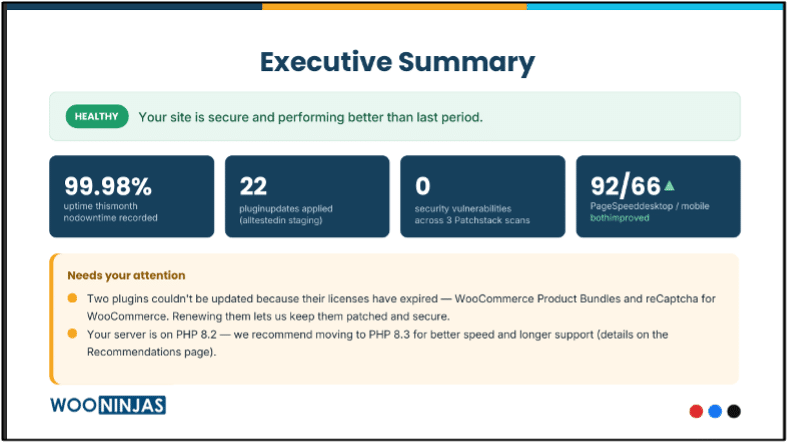
Regular WordPress maintenance gives website owners confidence that their site is secure, updated, and working properly. Instead of constantly worrying about technical difficulties, you can focus on managing your business and creating better experiences for your visitors.
Looking for a Ready-Made Solution?
Explore our WordPress, WooCommerce, and LMS plugins built to extend functionality without custom development.
Ongoing monitoring helps detect potential problems before they affect your website, while regular updates and optimization keep your site stable and reliable. From security checks and backups to performance improvements and compatibility updates, consistent maintenance ensures your website remains ready to support your goals.
WordPress Maintenance Checklist: Essential Tasks to Keep Your Website Healthy
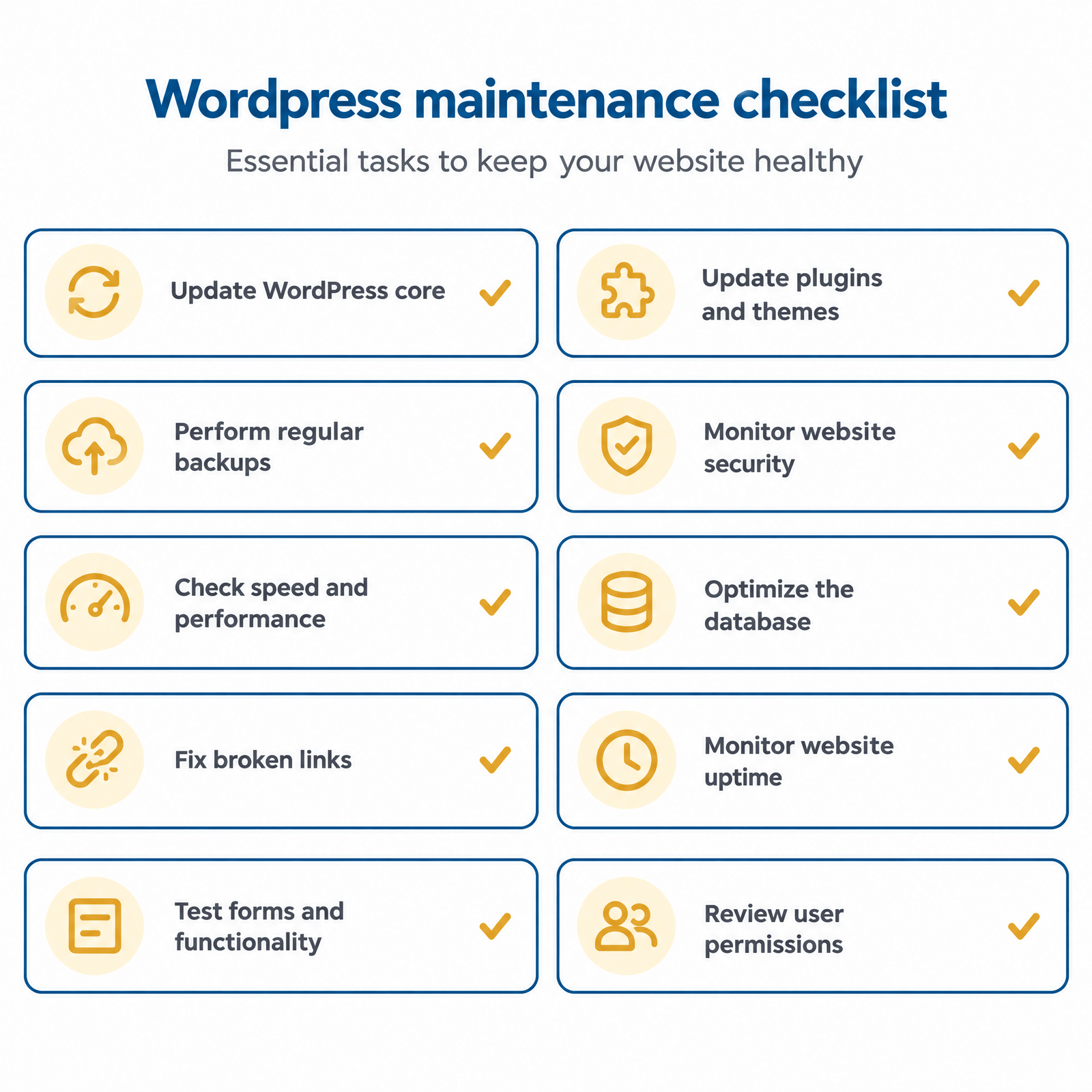
WordPress sites need regular maintenance to remain secure, functional, and optimized. WordPress is a great CMS platform for creating and maintaining websites, but you need to keep updating and checking it to avoid technical difficulties. A proper WordPress maintenance checklist lets website owners keep track of important tasks and maintain their website’s overall health.
Update WordPress Core
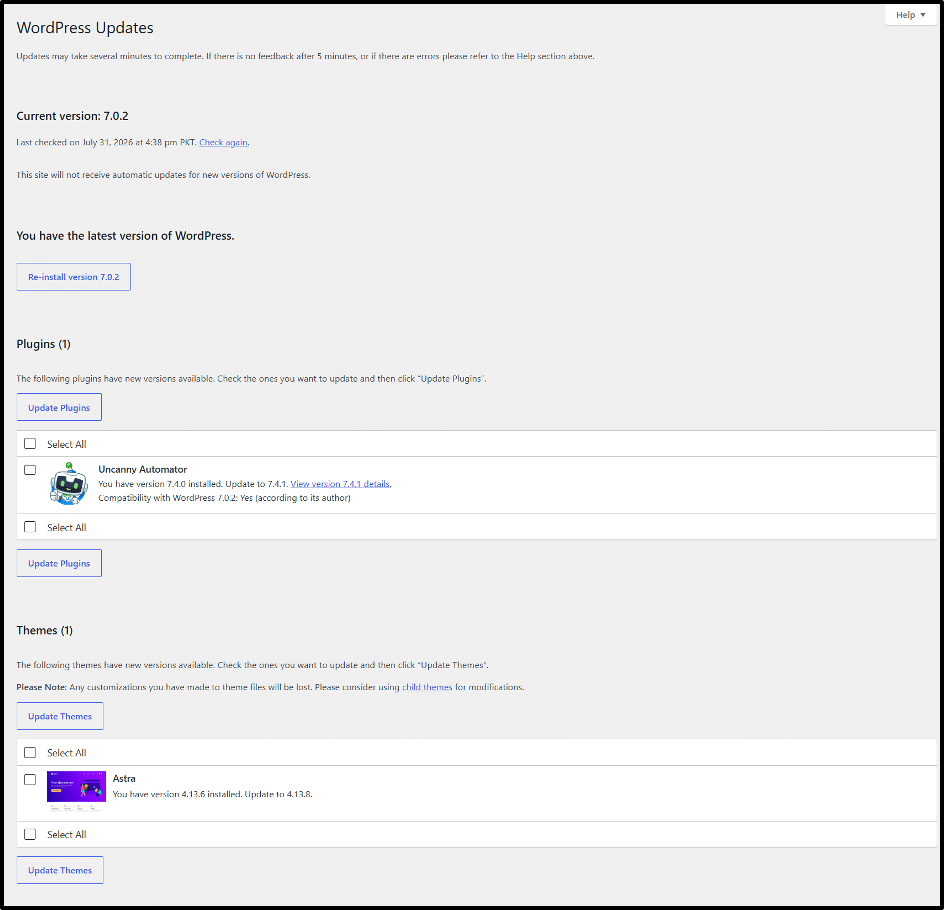
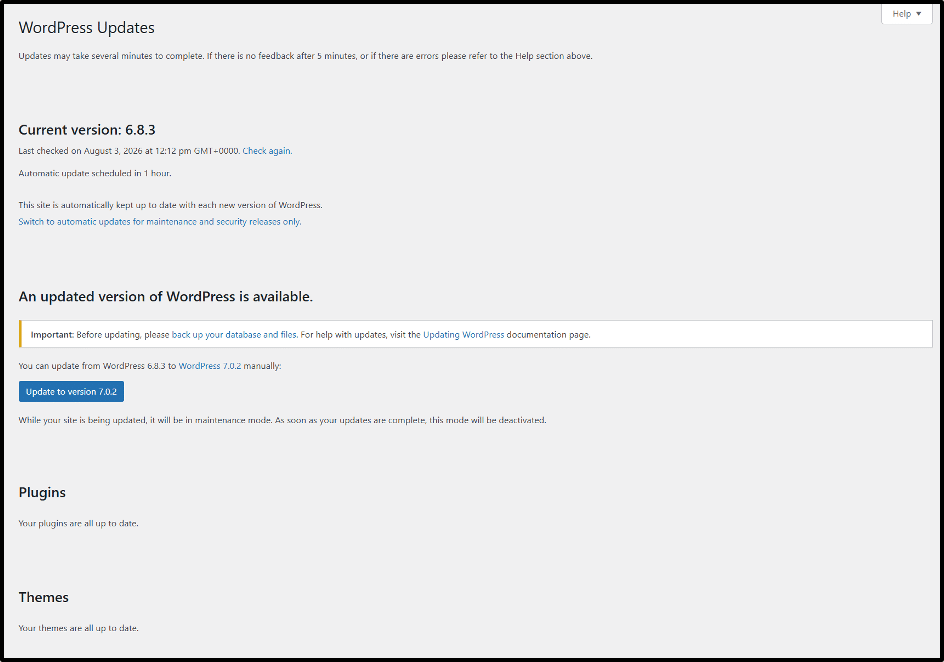
Keeping the WordPress core updated is one of the most important maintenance tasks. WordPress regularly releases updates that include security fixes, bug improvements, and new features. Running an outdated version can create security risks and compatibility issues with plugins and themes.
Before applying major updates, it is recommended to create a backup of your website. This allows you to restore your site if an update causes unexpected problems.
Update Plugins and Themes
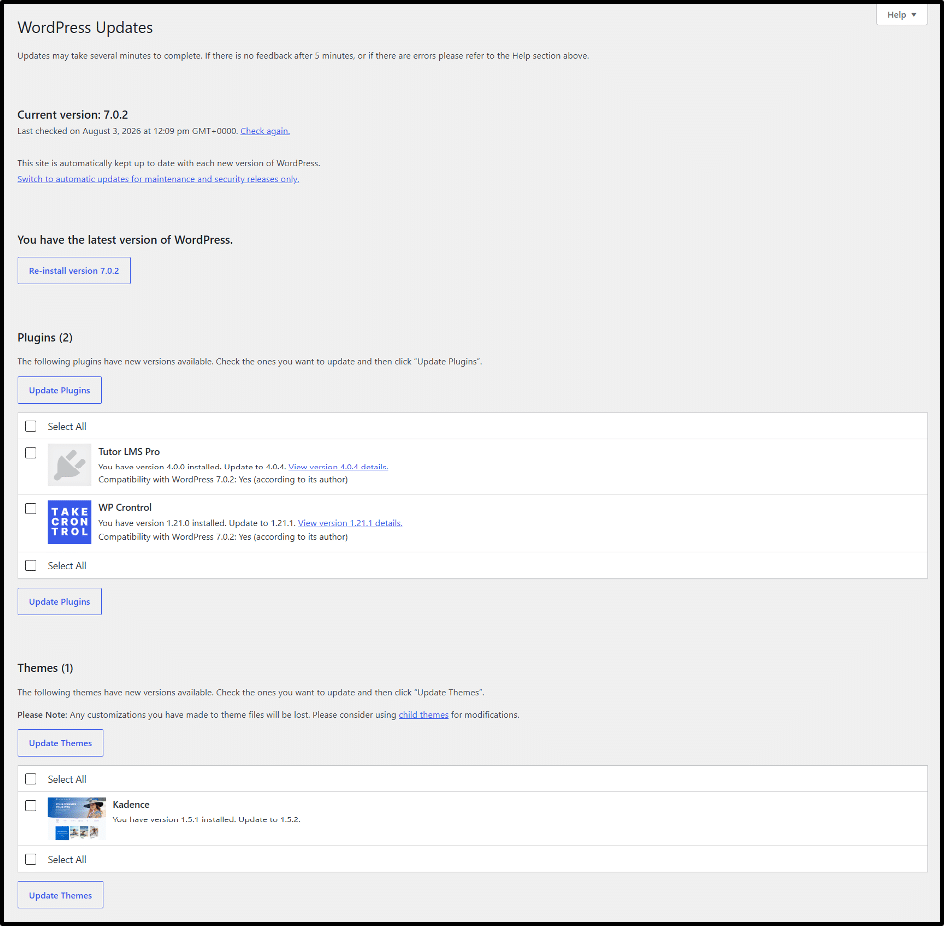
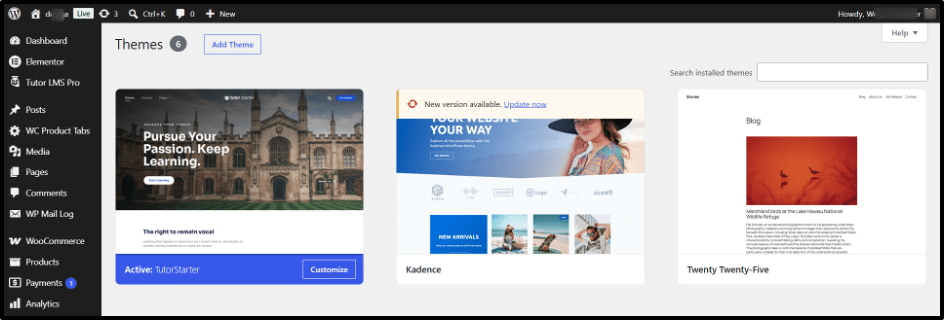
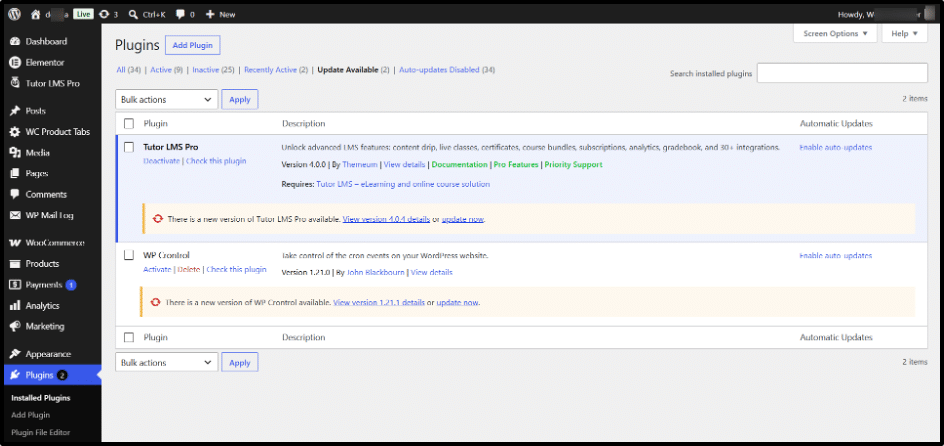
Plugins and themes add functionality and design features to your WordPress website, but they also require regular updates. Developers release updates to fix security vulnerabilities, improve compatibility, and resolve bugs.
Outdated plugins and themes can create conflicts, slow down your website, or cause certain features to stop working. Reviewing and updating them regularly helps maintain a stable website.
Perform Regular Backups
Regular backups protect your website data from unexpected problems such as failed updates, security issues, server errors, or accidental changes. A backup creates a copy of your website files and database, which you can restore when needed.
A reliable WordPress maintenance routine should include automated backups and regular checks to ensure backup files are available and working properly.
Monitor Website Security
Website security monitoring for WordPress helps identify suspicious activity and potential threats before they cause serious damage. Regular security checks, malware scans, and monitoring login activity can help protect your WordPress website.
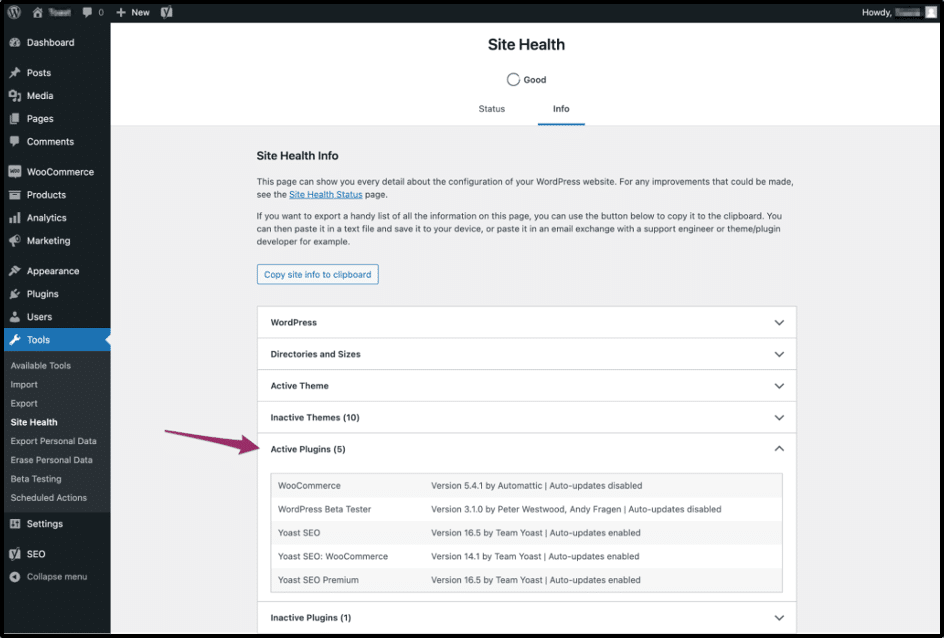
Security maintenance also includes removing unused plugins, keeping software updated, and reviewing user access permissions to reduce unnecessary risks.
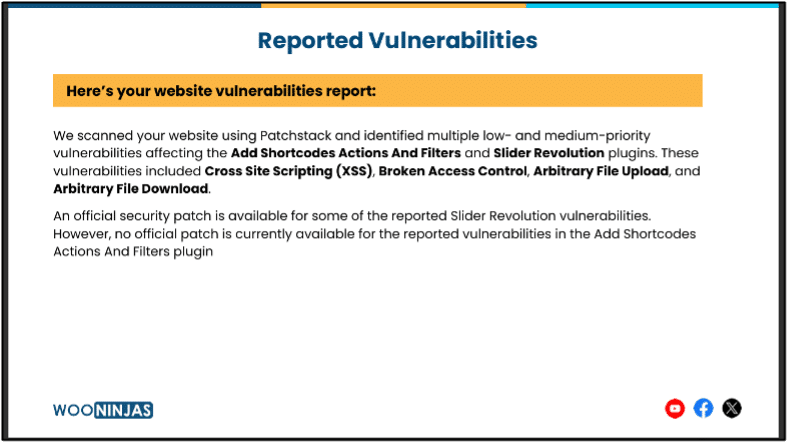
Check Website Speed and Performance
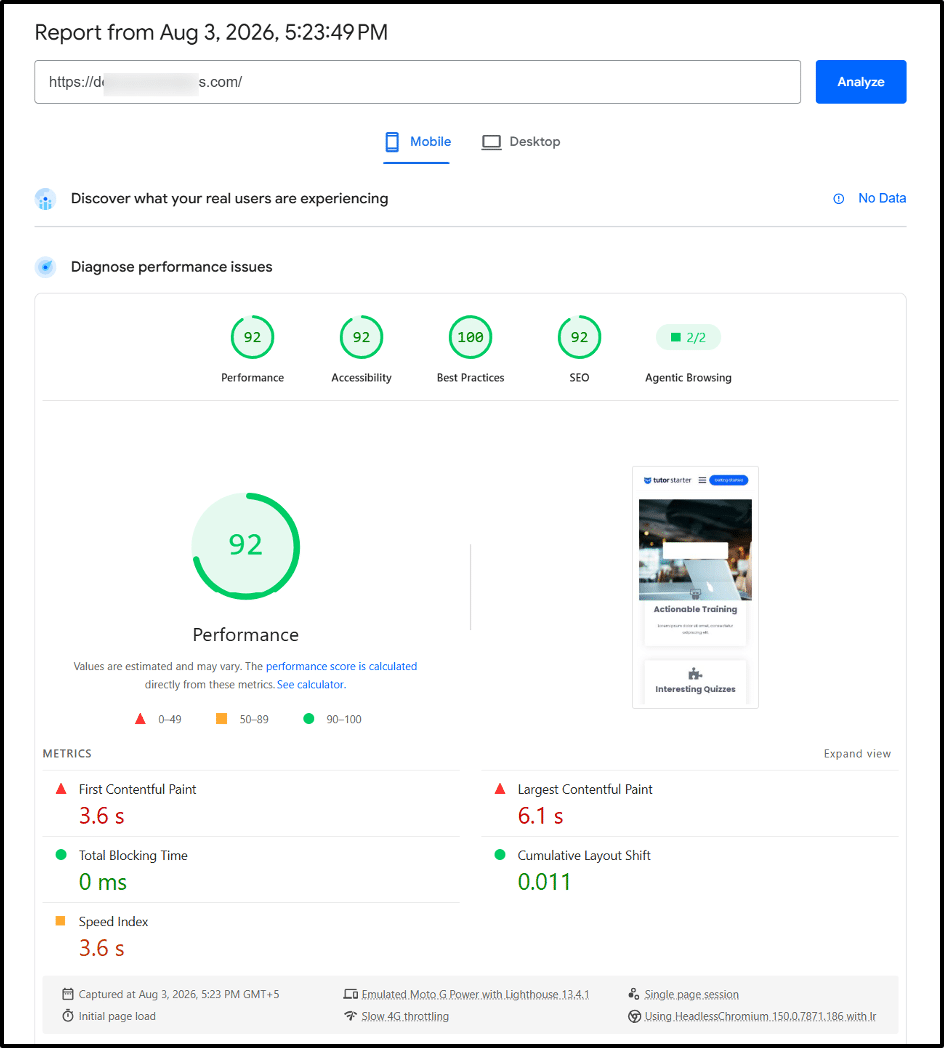
Website speed directly affects user experience and overall website performance. Slow-loading pages can frustrate visitors and may impact search engine performance.
Regular performance checks help identify issues affecting speed, such as large image files, outdated plugins, heavy themes, poor hosting performance, or database problems. Optimizing these areas helps your website load faster and provide a smoother experience.
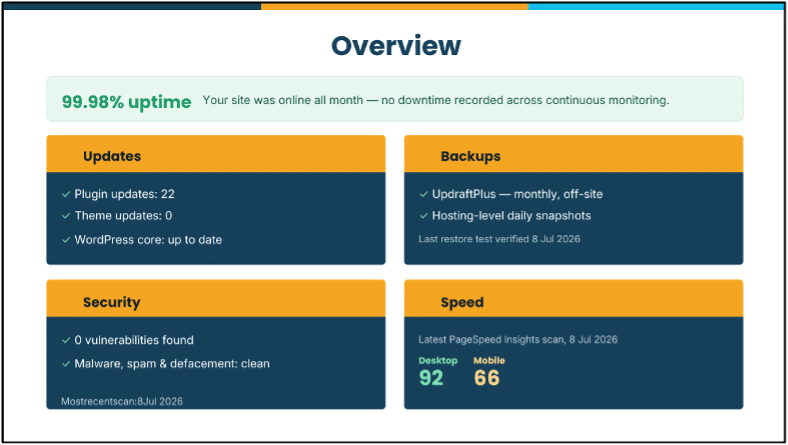
Optimize Database
The WordPress database stores important website information, including posts, pages, settings, and user data. Over time, unnecessary data such as old revisions, spam comments, and temporary files can increase database size.
Database optimization removes unnecessary data and helps your website run more efficiently. It is an important part of regular WordPress maintenance, especially for websites with a large amount of content.
Fix Broken Links
Broken links can negatively affect user experience and make it harder for visitors to navigate your website. They can also create technical SEO issues if important pages are no longer accessible.
Regularly checking and fixing broken links ensures that visitors can access the correct pages and that your website structure remains organized.
Monitor Website Uptime
Website uptime monitoring helps ensure your website is available to visitors. Unexpected downtime can affect user trust, conversions, and business operations.
By monitoring uptime regularly, website owners can quickly identify server problems, technical errors, or configuration issues and take action before they cause long-term problems.
Test Forms and Website Functionality
Forms, checkout pages, login systems, and other interactive features need regular testing to ensure they work correctly. A broken contact form or checkout process can prevent visitors from completing important actions.
Testing website functionality as part of your maintenance routine helps identify issues early and ensures visitors have a smooth experience.
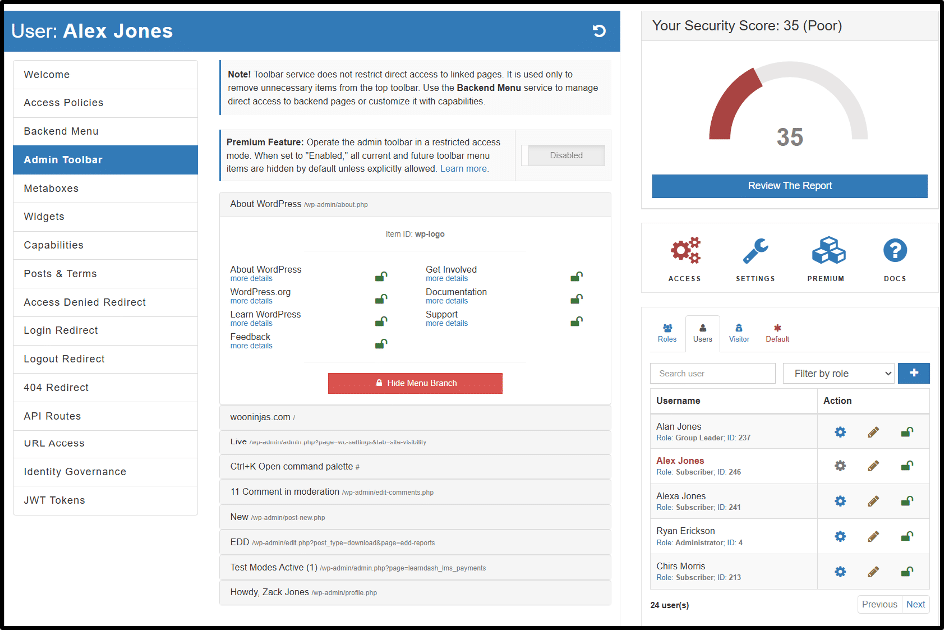
Review User Accounts and Permissions
Managing user accounts and permissions is an important security practice for WordPress websites with multiple users. Regularly reviewing user roles helps ensure that each person has the correct level of access.
Removing inactive accounts and updating permissions when needed reduces security risks and keeps website management more organized.
DIY vs. Professional WordPress Maintenance Services
Managing WordPress maintenance yourself can work for smaller websites with limited content and fewer features. However, it requires regular attention to updates, backups, security checks, and performance monitoring. Missing important tasks can lead to security risks, broken functionality, or unexpected downtime.
Professional maintenance services provide ongoing support by handling routine updates, website monitoring, backups, and technical issues. This allows business owners to focus on their core work while ensuring their website remains secure, optimized, and reliable.
For websites such as WooCommerce stores, membership platforms, and high-traffic sites, professional WordPress maintenance and support can be especially valuable. These websites often require more frequent checks and technical expertise to keep important features working properly.
How Often Should You Perform WordPress Maintenance?
The frequency of WordPress maintenance depends on your website size, traffic, and functionality. A small blogging site needs fewer checks, while an online store, membership site, LMS websites, or business website requires more ongoing monitoring to prevent issues.
Most maintenance tasks for WordPress websites should be divided into weekly, monthly, and ongoing activities. Weekly tasks usually include checking updates, security scans, and website speed, while monthly tasks can include database optimization, performance reviews, and removing unnecessary files.
A consistent WordPress maintenance schedule helps you catch problems early and keeps your website running smoothly, so you don’t have to wait for something to break.
Key Takeaways
- Regular updates to WordPress core, plugins, and themes close security gaps before attackers find them.
- Backups protect your data and let you recover fast if an update breaks something.
- Speed and database cleanup directly affect both user experience and SEO rankings.
- Skipping maintenance turns small problems into expensive emergency fixes.
- A weekly/monthly maintenance schedule beats waiting for your site to break.
Conclusion
Doing regular WordPress maintenance isn’t just about resolving issues after they appear. It is about preventing problems before they happen and affecting your website. Keeping your WordPress core, plugins, themes, security, backups, and performance regularly maintained helps your website stay secure, responsive, and reliable. A consistent maintenance routine reduces downtime, improves user experience, and protects your website over time.
Managing all these tasks regularly can be time-consuming, especially for businesses that need their websites to run without interruptions. Professional support can make website maintenance easier and more reliable.
Our WordPress maintenance service helps businesses manage updates, security monitoring, backups, performance checks, and technical improvements with support from the WooNinjas maintenance team. Contact us to keep your WordPress website updated, secure, and performing properly before small issues become bigger problems.
Frequently Asked Questions
What is WordPress maintenance?
WordPress maintenance is the process of regularly updating, monitoring, and optimizing a WordPress website to keep it secure, fast, and reliable. It includes tasks like updating plugins and themes, creating backups, checking security issues, and improving website performance.
What tasks does WordPress maintenance include?
Common WordPress maintenance tasks include updating WordPress core, plugins, and themes, creating backups, monitoring security, optimizing performance, checking uptime, fixing broken links, and testing website functionality.
What happens if you don’t maintain a WordPress website?
Without regular WordPress maintenance, your website can become vulnerable to security threats, slow down, experience plugin conflicts, and face unexpected downtime. Ignoring small issues can lead to bigger technical problems and expensive fixes over time.
How does WordPress maintenance improve website security and performance?
WordPress maintenance improves security by keeping software updated, monitoring threats, and reducing vulnerabilities. You can enhance performance by optimizing website speed, removing unnecessary data, and ensuring all website components function efficiently.
Can I maintain my WordPress website myself?
Yes, website owners can handle basic WordPress maintenance tasks themselves, especially updates, backups, and content checks. However, larger websites or businesses with limited time and technical knowledge may need additional help managing ongoing maintenance.
Should I hire WordPress maintenance services?
You should consider WordPress maintenance services if you do not have the time or technical knowledge to manage updates, backups, security monitoring, and performance improvements yourself. Our WooNinjas Professional WordPress team maintains and supports your website securely and runs it smoothly.
Need Ongoing WordPress Maintenance & Support?
We handle updates, performance monitoring, security hardening, and technical fixes so your WordPress and WooCommerce site stays stable and secure.
Plugin Not Working in WordPress? Here’s Why
Is your plugin not working in WordPress? Here are the 7 most common causes and fixes for plugin conflicts, errors,…
Read More...
WordPress SEO Consultant, Freelancer, or Agency: What Each Costs
Hiring SEO help gets expensive fast. See what an SEO consultant, freelancer, or agency really costs before picking one for…
Read More...
AEO vs. SEO: How to Get Your WordPress Site Cited in AI Answers
AEO vs. SEO explained in simple terms, plus the schema, content, and site fixes that help your WordPress site show…
Read More...
